
บทที่ 26 — GUI Shells
GUI Shell ให้คุณเปลี่ยน view ของ Chat / Terminal เป็น frontend
HTML ที่ออกแบบเฉพาะ domain — grid สำหรับ image generation,
dashboard trading, ตัวสร้าง campaign โฆษณา หรืออะไรก็ได้ Shell
ถูก render อยู่ใน iframe ที่ sandbox และคุยกับ agent ผ่าน bridge
เล็ก ๆ ชื่อ window.thclaws.* Built-in shell มากับ thClaws ส่วน
custom shell คือ folder ที่คุณวางลงดิสก์ shell ตัวเดียวกันยัง
serve ขึ้น cloud ที่ URL พร้อม token ได้ด้วย ทำให้ใช้จาก browser
บนมือถือหรือแชร์ให้เพื่อนร่วมทีมได้
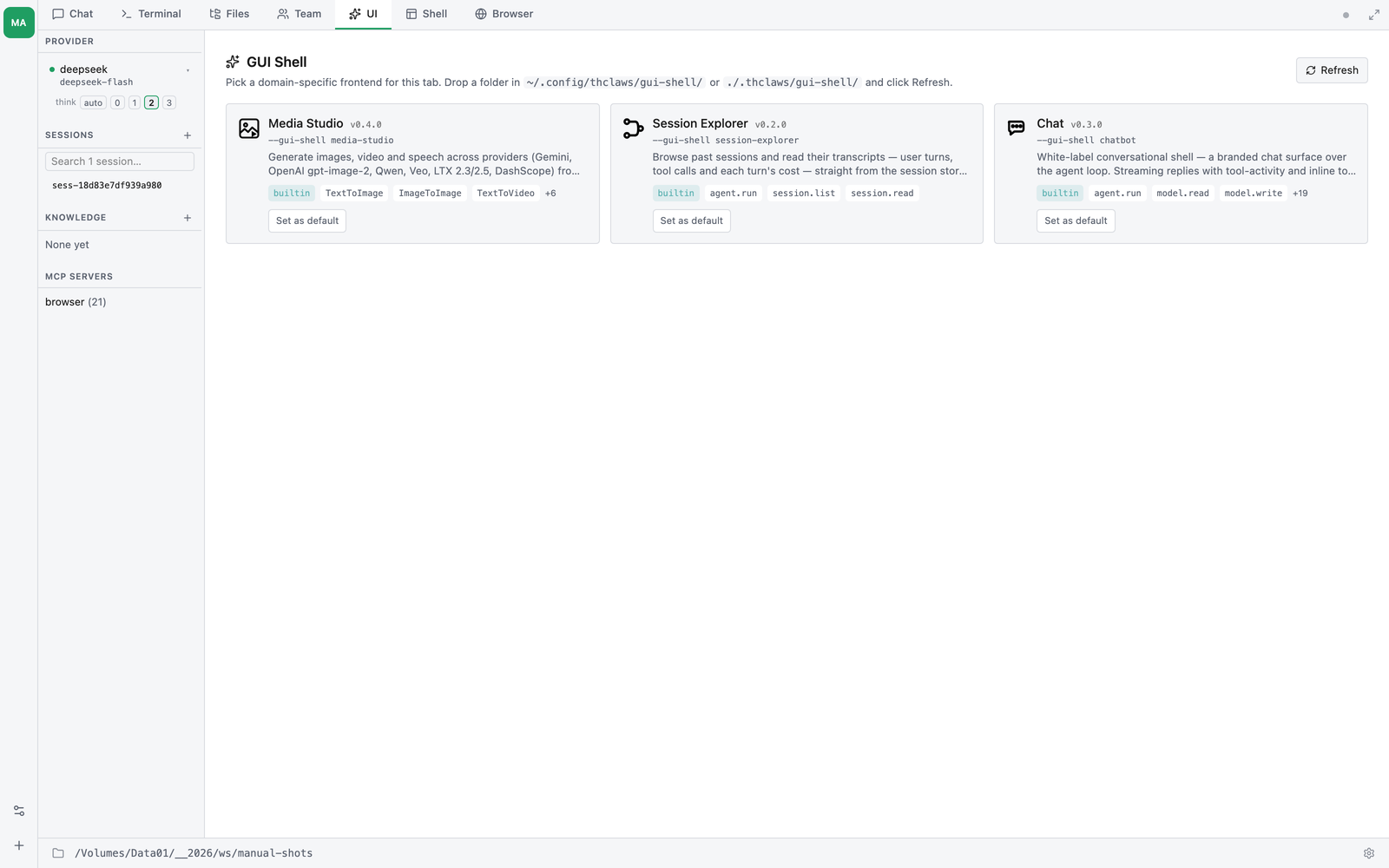
สถานะ: Tier 1 ลง v0.24 (Session Explorer + tab loader); Tier 2 เพิ่ม picker, custom shell, และ
--serve --gui-shell; Tier 3 เพิ่ม SDK, permission, และ marketplace ดู dev-plan/33 สำหรับ roadmap เต็ม หัวข้อด้านล่างจะติด tag ว่าแต่ละความสามารถลงที่ tier ไหน
ควรใช้ GUI Shell เมื่อไร
ใช้ GUI Shell เมื่องานมี วิธีแสดงผลที่ดีกว่า chat transcript และ user อยากโต้ตอบผ่านการแสดงผลนั้น ไม่ใช่พิมพ์ prompt:
- สร้างรูป — grid ของรูปที่สร้างก่อนหน้าดีกว่า scroll chat เพื่อ ดูว่า “ฉันสร้างอะไรไปบ้าง”
- รีวิว agent session ยาว ๆ — tree ของ tool-call ดีกว่า scroll
เป็นเส้นตรงเพื่อหา “มันเรียก
bq_queryที่ไหน” - สร้าง ad campaign — form ของ targeting filter ดีกว่าพิมพ์ อธิบายเป็นข้อความ
อยู่กับ Chat (บทที่ 4) ต่อไปเมื่อ workflow เป็นแบบสนทนาและเป็น text เป็นหลัก อยู่กับ Terminal (บทที่ 4) เมื่ออยากได้ raw ANSI stream GUI Shell เป็นของเพิ่ม ไม่ใช่ของแทนที่ทั้งคู่
สอง delivery mode
ทุก shell รันได้ใน 2 ที่ ผู้เขียน shell เขียน code ชุดเดียว ผู้ใช้เลือก surface เอง
| Mode | รันที่ไหน | URL surface | Auth | Bridge transport |
|---|---|---|---|---|
| A Desktop tab | thClaws GUI app | thclaws:// custom protocol |
desktop session | window.ipc.postMessage |
| B Serve / cloud | --serve listener |
https://host/t/<token>/ |
per-shell token ใน path | WebSocket |
Mode A เป็น default Mode B (Tier 2) ใช้สำหรับเรียก shell จากที่ อื่น — มือถือ เพื่อนร่วมทีม หรือ server แบบ headless
Mode A — เปิด shell ใน desktop GUI
Tier 1 — built-in อย่างเดียว
- เปิด thClaws (
thclawsหรือcargo run --features gui --bin thclaws) - คลิก ”+ New Tab” → “Open Session Explorer” (Tier 1 ส่ง built-in shell ตัวเดียวต่อตรงเข้า new-tab menu ส่วน picker สำหรับเลือกระหว่าง shell ลง Tier 2)
- Tab จะเปิดพร้อม UI ของ Session Explorer คลิก session ทาง ซ้าย คลิก node ของ tool-call ใน tree เพื่อกาง คลิก “Summarise” ให้ agent อธิบาย call นั้นใน 1 บรรทัด
- ปิด tab → session ของ shell ถูก persist ที่
./.thclaws/state/sessions/<id>.jsonl(ที่เดียวกับ session ของ Chat/Terminal เพิ่ม fieldshell: { id, version }ใน metadata — ยังcatได้ปกติ) - เปิดใหม่ภายหลัง → เลือก session เดิมจาก Sessions browser shell จะเปิดพร้อม state เดิม
Tier 2 — picker + custom shell
หลัง Tier 2:
- ”+ New Tab” → “GUI Shell” เปิด picker grid แสดง shell
ทุกตัวที่ติดตั้ง — built-in, user-level (
~/.config/thclaws/
   gui-shell/
), และ project-level (./.thclaws/gui-shell/) - ทุก card แสดง icon, ชื่อ, version, source (
builtin/user/project), permission ที่ประกาศไว้ และ session ที่ผ่านมา ของ shell นั้น (resume ได้คลิกเดียว) - คลิก card → shell ที่เลือกแทนที่ picker ใน Shell tab — Mode A
เปิดได้ทีละ shell ใน v0.24, multi-instance shell tabs ยังอยู่ใน
release ถัดไป (ส่วน multi-tenant
--serveสำหรับ host shell เดียวให้ผู้ใช้หลายคนได้ลงแล้ว — ดูหัวข้อ “Multi-tenant” ด้านล่าง) ใช้ breadcrumb “shells” เพื่อกลับมา picker แล้วเลือก shell อื่น - ปุ่ม “Refresh shells” rescan folder discovery โดยไม่ต้อง restart thClaws
ตั้ง default shell
ถ้าอยากให้ shell ตัวใดตัวหนึ่งเปิดเสมอเมื่อคลิก “New GUI Shell”
ตั้งใน settings.json:
// ./.thclaws/settings.json  (project — ชนะ)
// หรือ ~/.config/thclaws/settings.json  (user — fall through)
{ "guiShell": "session-explorer" }
แบบยาว ใช้เมื่อ default ของ desktop กับ serve ต่างกัน:
{
  "guiShell": {
    "tabDefault":   "session-explorer",   // ใช้กับ Mode A "New Shell"
    "serveDefault": "my-image-bot"      // ใช้กับ fallback ของ Mode B --serve
  }
}
Media Studio shell (built-in)
thClaws มี shell มาให้สามตัว — Session Explorer, Chatbot และ Media Studio โดย Media Studio เป็นหน้าจอแบบคลิก ๆ สำหรับเครื่องมือ สร้างภาพและวิดีโอ (บทที่ 11) ให้สร้างสื่อได้โดยไม่ต้องพิมพ์ tool call ในแชต
เปิดจาก picker ของ GUI Shell (media-studio) หรือ pin ไว้:
// ./.thclaws/settings.json
{ "guiShell": "media-studio" }
มันทำอะไรได้:
- สลับโหมด — Text → Image, Image → Image (แก้ภาพ), Text → Video, Image → Video
- เลือก provider / model พร้อมตัวควบคุม resolution สำหรับวิดีโอ (720P / 1080P)
- แกลเลอรี ของทุกอย่างที่อยู่ใน
output/อยู่แล้ว (ไม่ใช่แค่ที่เพิ่ง สร้าง) — คลิกชิ้นไหนก็ได้เพื่อตั้งเป็นภาพต้นทางของงาน Image → Image หรือ Image → Video หรือคลิกเพื่อเปิดดูใน lightbox - วิดีโอ async จัดการให้อัตโนมัติ — shell จะ submit งานแล้ว poll
MediaJobStatusจนคลิปเสร็จ แล้วหย่อนลงแกลเลอรี
Media Studio เปิด media tools ให้อัตโนมัติ สำหรับ session ของมันเอง
จึงไม่ต้องตั้ง mediaToolsEnabled ก่อน — แต่ยังต้องมี key ของ provider
ที่เกี่ยวข้อง (GEMINI_API_KEY / OPENAI_API_KEY / DASHSCOPE_API_KEY
ดูบทที่ 11) ใน environment หรือ keychain
Mode B — serve shell ขึ้น cloud (Tier 2)
ใช้สำหรับเปิด shell จากมือถือ แชร์ให้เพื่อนร่วมทีม หรือรันบน server
เรียกใช้
thclaws --serve --gui-shell my-image-bot --port 8080
stdout:
Serving My Image Bot (v0.1.0) at
  https://localhost:8080/t/abc...xyz/
Token persisted to ~/.config/thclaws/gui-shell-tokens.json
เปิด URL นั้นใน browser ตัวไหนก็ได้ จะมี landing flash บอก
Connecting to: my-image-bot v0.1.0 on <host> แล้ว shell
render เต็มหน้า — UI เดียวกับ Mode A bridge เดียวกัน แค่
WebSocket อยู่ข้างใต้แทน Tauri IPC
Token คือ credential
- URL
https://host:8080/t/<token>/คือทุกอย่างที่ต้องใช้ ใครมี ก็เข้าได้ ใครไม่มีจะได้ 404 เงียบ ๆ (server ไม่บอกด้วยซ้ำว่ามี shell bound อยู่) - Token ถูกสร้างตอน launch ครั้งแรกและ persist ที่
~/.config/thclaws/gui-shell-tokens.jsonkey เป็น(shellId, port)restart--serveจะได้ URL เดิม การแชร์ครั้งเดียวเลย ใช้ได้นาน - URL ตรง ๆ อย่าง
/gui-shell/session-explorer/หรือ/shells/จะคืน 404 มีแค่ shell ที่ launch ด้วย--gui-shellเท่านั้นที่ เข้าถึงได้ และเข้าได้ผ่าน/t/<token>/เท่านั้น
Pin token (สำหรับ deployment)
สำหรับ k8s manifest หรือ systemd unit ที่ต้องการ URL คงที่:
thclaws --serve \
        --gui-shell my-image-bot \
        --gui-shell-token "$MY_TOKEN" \
        --gui-shell-token-ttl 90d \
        --port 8080
Rotate
ถ้า URL หลุดหรืออยากยกเลิกการแชร์:
thclaws shell rotate-token my-image-bot
# → พิมพ์ URL ใหม่ URL เก่าหยุดทำงานทันที
No-auth mode (localhost / intranet เท่านั้น)
thclaws --serve --gui-shell my-image-bot --gui-shell-no-auth
Route ขึ้นที่ / ตรง ๆ — ไม่มี prefix /t/<token>/ default จะ
ปฏิเสธการ bind บน address ที่ไม่ใช่ loopback ถ้าอยากเปิด
unauthenticated บน public IP (ควรรู้ว่ากำลังทำอะไร — ปกติต้องมี
auth proxy ของคุณเองอยู่หน้า):
thclaws --serve --gui-shell my-image-bot \
        --gui-shell-no-auth --gui-shell-no-auth-allow-public \
        --bind 0.0.0.0 --port 8080
Pattern guardrail เดียวกับ --dangerously-skip-permissions
(บทที่ 5)
Serve default จาก settings.json
ถ้าไม่ใส่ --gui-shell launcher จะอ่าน guiShell.serveDefault
(หรือ shorthand guiShell ถ้าเป็น string) จาก settings.json
ถ้าไม่ได้ตั้ง --serve จะทำงานเดิม — serve React frontend ปกติ
Multi-tenant — shell เดียว, ผู้ใช้หลายคน
ทุกอย่างข้างต้น (“Mode B”) เป็น single-tenant — ทุกคนที่เข้า URL เดียวกันจะแชร์ agent / session / storage ก้อนเดียว เหมาะตอนแชร์ shell ให้เพื่อนร่วมทีมหรือใช้กับมือถือตัวเอง
ถ้าอยาก host shell ให้ผู้ใช้หลายคน — ต่างคนต่างมีบทสนทนา
gui-shell storage และไฟล์ output ของตัวเอง — เพิ่ม --multi-tenant
กับ HMAC secret ที่แชร์กัน:
thclaws --serve --gui-shell my-image-bot \
        --multi-tenant \
        --multi-tenant-secret "$THCLAWS_CLOUD_HMAC_SECRET" \
        --port 8080
(--multi-tenant-secret รับจาก env THCLAWS_CLOUD_HMAC_SECRET
ได้ด้วย — รูปแบบที่ใช้ตอน deploy จริง)
โหมดนี้คาดว่า request มาจาก routing layer ที่เชื่อถือได้ (ปกติคือ thClaws.cloud) ซึ่งจะแนบ 3 header ที่เซ็นแล้วมาทุก request:
X-Thclaws-User:       <user_id>           # filesystem-safe, [a-zA-Z0-9_-], ≤64 ตัว
X-Thclaws-User-Ts:    <unix_seconds>
X-Thclaws-User-Proof: hex(HMAC-SHA256(secret, "<user_id>:<ts>"))
สิ่งที่จะได้:
- Agent + session แยกต่อ user — alice กับ bob ใน pod เดียวกัน ต่างคนต่างมีบทสนทนา
- Storage แยกต่อ user —
thclaws.storage.set("notes", …)ของ alice ไปusers/alice/storage/<shell>/…ของ bob ไปusers/bob/...ไม่ชนกันบน key เดียวกัน - Output แยกต่อ user — ไฟล์ที่ agent สร้างไปอยู่ที่
output/users/<id>/...และ file-asset URL จะไม่ serve subtree ของ user อื่นแม้จะเดา URL ได้ - LRU + idle eviction —
--multi-tenant-max-users 1000(default) กับ--multi-tenant-idle-timeout 30m(default) คุม resource - Restart-resumable — session JSONL ของ alice รอด pod restart เมื่อ alice เชื่อมต่อใหม่บทสนทนาเดิมจะโหลดกลับมาจาก disk
Shell author เขียน shell เหมือนเดิม เป๊ะกับ single-tenant Mode B — ไม่ต้องแก้ code อะไร bridge จะ route storage / file-asset ผ่าน prefix ต่อ user ให้อัตโนมัติ
นี่คือสิ่งที่อยู่เบื้องหลัง thClaws.cloud (dev-plan/34)
สำหรับ contract เต็ม — สูตรเซ็น HMAC, layout บน disk, semantics
ของ registry, curl smoke recipe, และสิ่งที่ Tier 1 ยังไม่มี
(object storage, cross-pod state portability, cgroup-style
resource limits) — ดู
thclaws-technical-manual/multi-tenant-serve.md
ติดตั้ง custom shell (Tier 2)
Shell ก็คือ folder วางที่ใดที่หนึ่งใน 2 ที่:
~/.config/thclaws/gui-shell/<id>/      # cross-project ทุก workspace เห็น
./.thclaws/gui-shell/<id>/              # repo-scoped project override โดย id
Folder ต้องมี:
<id>/
  manifest.json         # ดูด้านล่าง
  index.html            # entry point — bridge ถูก inject ตอน serve
  ...                   # CSS / JS / รูป / font อะไรก็ได้
manifest.json ขั้นต่ำ:
{
  "id": "hello-shell",
  "name": "Hello Shell",
  "version": "0.1.0",
  "description": "Smallest possible shell.",
  "entry": "index.html",
  "icon": "icon.svg",
  "minBridgeVersion": "1",
  "permissions": ["agent.run"]
}
ใน GUI: เปิด picker คลิก “Refresh shells” — shell ของคุณจะ ปรากฏข้าง built-in
Project shell จะ override user shell ที่ id เดียวกัน เหมาะ เมื่อทีมอยากแจกเวอร์ชัน customise ของ public shell ให้ทุกคนใน repo
Tier 3 — ติดตั้งจาก git URL
thclaws shell install https://github.com/someone/cool-shell
thclaws shell install ./mything --scope project   # default: user
thclaws shell list
thclaws shell remove cool-shell
ตอน install ครั้งแรก จะมี permission prompt สรุปสิ่งที่ shell ประกาศว่าต้องใช้:
“Shell ตัวนี้ต้องการ: รัน agent, เรียก
mcp__pinn_ai__text2image, เก็บข้อมูลใน<shell-root>/state/, อ่าน session ของคุณ อนุญาตหรือไม่?”
Grant ถูก persist ที่ ~/.config/thclaws/gui-shell-grants.json
(user-scoped — เพื่อนที่ clone repo ไม่ inherit การตัดสินใจของ
คุณ) เพิกถอนได้จาก context menu ของ picker หรือผ่าน
thclaws shell remove
เขียน shell ของตัวเอง (Tier 3)
Shell คือ HTML + CSS + JS ไม่ต้องมี build step
Starter template
thclaws shell new dashboard ./my-shell     # scaffold จาก template
thclaws shell preview ./my-shell           # serve พร้อม hot reload
shell new รับ template id — chat-enhanced, grid, form,
dashboard, kanban, document, report — แล้วเขียน shell ที่ใช้งานได้
ลงในโฟลเดอร์ปลายทาง (ถ้าโฟลเดอร์ไม่ว่างจะถูกปฏิเสธ เว้นแต่ใส่ --force)
shell preview รัน shell กับ mock agent ที่ http://localhost:<port>/
และ reload ทุกครั้งที่ save คุณจึงพัฒนา UI ได้โดยไม่เปลืองโทเคน ใส่
--port 0 เพื่อให้เลือกพอร์ตว่างให้เอง
คำสั่งที่เหลือสำหรับการพัฒนา
| คำสั่ง | ทำอะไร |
|---|---|
thclaws shell check <path> |
lint โฟลเดอร์ แจ้ง warning และ error และ exit 1 ถ้ามี error |
thclaws shell pack <path> |
รวมเป็นไฟล์ HTML เดียว โดย inline ไฟล์ข้างเคียงเข้าไป |
thclaws shell login / logout |
ยืนยันตัวตนสำหรับการ publish |
thclaws shell publish <path> |
publish shell |
มีชื่อไฟล์ manifest สองแบบ และใช้แทนกันไม่ได้ คำสั่งฝั่งพัฒนา (
new/preview/check/pack/publish) อ่านshell.jsonส่วน registry ตอนรัน — ตัวที่ทำให้ shell โผล่ใน picker — ค้นหาโฟลเดอร์จากmanifest.jsonshell ที่ lint ผ่านแต่ไม่เคยโผล่ใน picker มักเป็นเคสนี้ คือมีshell.jsonแต่ไม่มีmanifest.json
Bridge — window.thclaws.*
JavaScript ของ shell จะได้ global ตัวเดียว ทุกอย่างเป็น async
// Identity
thclaws.shell.id          // "hello-shell"
thclaws.shell.sessionId   // session ที่ tab นี้ bound กับ
thclaws.transport         // "tauri" (Mode A) หรือ "ws" (Mode B)

// รัน agent — loop เดียวกับที่ขับ Chat/Terminal
const { runId } = await thclaws.run("Summarise this in one line.");

// ยกเลิก turn ที่กำลังรัน (เทียบเท่า Cmd+. ใน Chat)
thclaws.cancel(runId);

// Subscribe event streaming — on() คืน function สำหรับ unsubscribe
const unsubscribe = thclaws.on("text", (chunk) => render(chunk));
thclaws.on("ready",       ()        => …);   // bridge พร้อม (Mode A)
thclaws.on("tool_call",   (call)   => …);   // Tier 2
thclaws.on("tool_result", (result) => …);   // Tier 2
thclaws.on("done",        ()        => …);
thclaws.on("error",       (err)     => …);

// หรือ consume turn เป็น async stream (น้ำตาลเคลือบ run() + on())
for await (const ev of thclaws.streamTurn("Summarise this.")) {
  if (ev.type === "text") render(ev.delta);
  else if (ev.type === "tool_call") showSpinner(ev.label);
}

// เรียก tool ตรง ๆ — bypass agent loop สำหรับ action ที่ deterministic
// callTool() คือชื่อที่ควรใช้ต่อไป; tools.invoke() เป็น alias เก่า
// พฤติกรรมเหมือนกัน `<name>` คือ tool ที่ register แล้ว — ส่วนใหญ่
// เป็น MCP tool เช่น `mcp__pinn_ai__text2image` (sanitised จาก
// server name) หรือ built-in เช่น `Ls` tool แบบอ่านอย่างเดียวเรียก
// ได้ตรง ๆ; tool ที่แก้ไข (Bash/Write/Edit/…) จะ reject ด้วย
// "requires approval" ส่วนใหญ่แนะนำให้ใช้ thclaws.run() + AGENTS.md
const result = await thclaws.callTool("mcp__your_server__your_tool", { … });

// แปลง path ของไฟล์ที่ agent สร้างให้เป็น URL ที่ browser โหลดได้ —
// เช่น <img src={thclaws.fileUrl(payload.file)}> Mode B รับ path
// relative กับ project root ของ shell; Mode A ต้องเป็น absolute path
// (ไม่งั้นคืน null)
const src = thclaws.fileUrl("output/diagram.svg");

// Storage ของ shell แยกตาม session
// (Tier 2; เก็บเป็นไฟล์ที่ <shell-root>/state/<sessionId>.json)
await thclaws.storage.set("last_query", query);
const last = await thclaws.storage.get("last_query");
await thclaws.storage.delete("last_query");  // ลบ key ออกจริง

// เชื่อมกับ UI ของ host — theme + full-screen bridge mirror theme
// ของ host ไปที่ document.documentElement[data-theme] + color-scheme
// ให้แล้ว shell ส่วนใหญ่จึง theme ด้วย CSS ล้วน ไม่ต้องแตะตรงนี้
thclaws.ui.theme            // "light" | "dark" (theme ที่ host resolve)
thclaws.ui.isFullscreen     // true เมื่อ host แสดง shell แบบ full-screen
thclaws.ui.onTheme((t)   => repaint(t));         // ยิงทันที + เมื่อเปลี่ยน
thclaws.ui.onFullscreen((active) => {            // ยิงทันที + เมื่อเปลี่ยน
  myExitButton.hidden = !active;
  if (active) thclaws.ui.claimExitControl();     // ซ่อนปุ่ม exit fallback ของ host
});
myExitButton.onclick = () => thclaws.ui.exitFullscreen();
คำขอใด ๆ ที่ host ตอบไม่ได้จะ self-reject หลัง 15 นาที shell จึงไม่มีทาง ค้างเพราะคำตอบหาย
ส่วนที่เหลือของ bridge
บล็อกข้างบนคือสิ่งที่ shell ส่วนใหญ่ต้องใช้ นอกเหนือจากนั้น bridge ยังเปิด หน้าตั้งค่าต่าง ๆ ของแอปให้ด้วย แต่ละอันมี permission ของตัวเอง — shell จึง เป็นแผงควบคุมได้ ไม่ใช่แค่หน้า chat ทุกอย่างเป็น async และอะไรที่ไม่ประกาศไว้ ใน manifest จะ throw ตอนเรียก
| Namespace | Method | Permission |
|---|---|---|
thclaws.sessions |
list() · load(id) · new() · rename(id, title) · delete(id) |
session.list สำหรับ list, session.read สำหรับ load, session.write สำหรับที่เหลือ |
thclaws.model |
get() · list() · set(id) · onChange(cb) · current |
model.read / model.write |
thclaws.mode |
get() · set(mode) — permission mode (บทที่ 5) |
mode.write (ทั้งคู่) |
thclaws.memory |
getCore() · setCore(text) |
memory.read / memory.write |
thclaws.kms |
list() · browse(name) · create(name) · ingest(kms, path) |
kms.read / kms.write |
thclaws.research |
list() · get(id) |
research.read |
thclaws.schedule |
list() · create(prompt, cron) · delete(id) · setEnabled(id, on) |
schedule.read / schedule.write |
thclaws.heartbeat |
get() · set(interval) |
schedule.read / schedule.write |
thclaws.skills |
list() · get(name) · install(url, opts) · save(name, body) · delete(name) |
skills.read / skills.write |
thclaws.plugins |
list() · install(url, opts) · setEnabled(name, on) · remove(name) |
plugins.read / plugins.write |
thclaws.connectors |
list() · add({name, url, headers}) · remove(name) — MCP server, HTTP เท่านั้น |
connectors.read / connectors.write |
thclaws.llm |
complete({prompt, system, maxTokens}) — เรียกโมเดลครั้งเดียว ไม่มี agent loop ไม่มี tool |
llm.complete |
thclaws.keys |
set(provider, key) — เขียนอย่างเดียว ไม่มี getter |
keys.write |
thclaws.profile |
get() |
— |
thclaws.permissions |
list() · has(action) — ถามว่าตัวเองได้สิทธิ์อะไรมา |
— |
มีสองตัวที่ควรคิดให้ดีก่อนประกาศ keys.write ให้ shell เขียน API key ของ
provider ลง config ของ user ได้ ออกแบบให้เขียนอย่างเดียว shell จึงช่วยตั้งค่า
key ให้ได้ แต่อ่านกลับไม่ได้เลย ส่วน connectors.write ให้ shell ลงทะเบียน
MCP server ได้ ซึ่งเท่ากับเพิ่ม tool ให้ agent ของ user — ประกาศต่อเมื่อนั่น
คือสิ่งที่ shell ของคุณมีไว้ทำจริง ๆ
thclaws.llm.complete เป็นทางออกสำหรับกรณีที่อยากได้โมเดลแต่ไม่เอา agent —
ไม่มี tool ไม่มี approval ไม่มีประวัติ session มีแต่ completion ถ้าอยากได้
agent loop จริง ๆ ให้ใช้ thclaws.run()
Bridge คือ API ทั้งหมด Shell แตะ filesystem ของ workspace
ไม่ได้ แตะ network ไม่ได้ (ถ้าไม่ประกาศ network.outbound:<host>
ใน Tier 3) และแตะ storage ของ shell อื่นไม่ได้ namespace
storage ของ shell 2 ตัวแยกกันโดย id
Permission (Tier 3)
ประกาศใน manifest.json::permissions ว่า shell ทำอะไรบ้าง:
| Permission | อนุญาตให้ |
|---|---|
agent.run |
เรียก thclaws.run() และ subscribe event |
tools.invoke:<name> |
เรียก thclaws.callTool("<name>", …) / thclaws.tools.invoke(…) ตรง ๆ ทีละ tool |
session.read / session.list |
อ่านข้อมูล session sidecar |
fs.shell-scoped |
read/write ภายใน root ของ shell ตัวเอง |
network.outbound:<host> |
fetch() ไปยัง host นั้น (CSP inject ตอน serve) |
approval.inline |
shell แสดง widget approve/deny ของตัวเอง (thclaws.approvals.*) แทน system modal |
model.read / model.write |
thclaws.model.* — ดู / สลับ model |
mode.write |
thclaws.mode.* — อ่านหรือเปลี่ยน permission mode |
memory.read / memory.write |
thclaws.memory.* — ข้อความ core memory |
kms.read / kms.write |
thclaws.kms.* — browse, create, ingest |
research.read |
thclaws.research.* — research job |
schedule.read / schedule.write |
thclaws.schedule.* และ thclaws.heartbeat.* |
skills.read / skills.write |
thclaws.skills.* — list, install, แก้ไข, ลบ skill |
plugins.read / plugins.write |
thclaws.plugins.* |
connectors.read / connectors.write |
thclaws.connectors.* — ลงทะเบียน MCP server |
llm.complete |
thclaws.llm.complete() — เรียกโมเดลเปล่า ๆ |
keys.write |
thclaws.keys.set() — เขียน API key ของ provider (อ่านไม่ได้) |
session.read / session.list / session.write |
thclaws.sessions.* |
การประกาศ tools.invoke:<name> ตัวใดตัวหนึ่งจะ จำกัด ให้ shell เรียกได้
เฉพาะ tool ที่ประกาศ (tools.invoke:* = ทุกตัว); ถ้าไม่ประกาศเลยจะเรียกได้ไม่จำกัด
User จะเห็น list นี้ก่อนติดตั้ง อะไรที่ไม่ประกาศจะ throw ตอน call
การ lint
thclaws shell check ./my-shell
# ตรวจ: manifest ถูกต้อง, entry มีจริง, permission สมเหตุสมผล,
# ไม่มี Tauri-only API ที่จะพังใน Mode B, ไม่มี external link ที่
# ทำให้ token leak ทาง Referer
ถ้ามีอะไรเป็น error จะ exit 1 จึงเอาไปใส่ CI หรือ pre-commit hook ได้เลย
(เอกสารเก่าบางฉบับเรียกคำสั่งนี้ว่า shell doctor ตัวจริงคือ check)
Session และ persistence
Shell session คือ session ของ thClaws ปกติ format JSONL เหมือนกัน
ที่เดียวกัน (./.thclaws/state/sessions/<id>.jsonl) กลไก --resume
เดียวกัน เพิ่มแค่ field shell: { id, version } ใน session
header ที่เป็น optional — session ที่ไม่ใช่ shell ยังเขียน JSONL
เหมือนเดิมทุกตัวอักษร ดังนั้น cat ยังใช้ได้กับทุก session
# ดู session ของ shell เหมือน session อื่น
cat ./.thclaws/state/sessions/sess-abc123.jsonl | head -3
# {"type":"header","id":"sess-abc123","shell":{"id":"image-generator","version":"0.1.0"},…}
# {"type":"user","content":"generate a picture of a sunset"}
# {"type":"assistant","content":[…]}
ปิด tab shell → session ถูก persist เปิดใหม่จาก “Past sessions”
ใน picker → resume ได้ session ที่ stamp shell.id ไว้จะเปิดได้
ใน shell ตัวนั้นเท่านั้น ไม่มี view fallback แบบ chat ทั่วไปใน
v1 (เป็น open question ระดับ Tier 3+)
เรื่อง cost
Shell ที่เรียก thclaws.run() กิน token เท่ากับ turn ของ Chat
tab Shell ที่เรียก thclaws.tools.invoke() ตรง ๆ ข้าม agent loop
ทั้งหมด — ไม่กิน model token สำหรับ call นั้น แค่ค่า tool เอง
(เช่น provider image generation คิดเงิน)
ใน Tier 3 manifest ประกาศ daily token budget ได้ และ permission
prompt จะแสดง (“อนุญาตให้ใช้ได้ถึง 50k tokens/day หรือไม่?”) กลไก
budget accounting เดิมจะ track usage shell ที่ใช้เกิน budget จะ
ได้ rejected promise จาก thclaws.run()
ช่องว่างที่ยังเหลืออยู่
ทุกอย่างที่แผน tier เดิมบอกว่ายังไม่มี ตอนนี้ ship แล้ว — ทั้ง picker, custom shell, bridge surface ที่กว้างขึ้น, serve mode, การ enforce permission และ CLI สำหรับพัฒนา ล้วนอธิบายไว้ข้างบนแล้ว ที่ยังควรรู้คือ
shell.jsonกับmanifest.jsonCLI ฝั่งพัฒนากับ registry ตอนรัน อ่านชื่อไฟล์คนละตัว (ดูข้างบน) จนกว่าจะรวมกันได้ shell ที่คุณจะทั้งพัฒนา และติดตั้งในเครื่องต้องมีทั้งสองไฟล์- Mode B คือ shell ทั้งตัว ไม่ใช่แท็บเดียว
--serve --gui-shellเปิด shell นั้นตัวเดียวและไม่มีอย่างอื่น ไม่มีวิธี serve ตัว picker เอง - ยังไม่มี grid แสดง worker/agent สด ๆ UI ของ shell แสดงผลลัพธ์ที่ stream ออกมาได้ แต่ไม่มีแดชบอร์ดรวมของ run ที่รันพร้อมกัน
Security model — แต่ละ mode ป้องกันอะไรจริง
- iframe sandbox ของ Mode A — ทุก shell รันใน
<iframe
  sandbox="allow-scripts allow-same-origin">
shell ที่ buggy เรียกdocument.location = "…"จะ navigate parent GUI ไม่ได้ การแยก origin ระดับ shell (subdomain ใน custom protocol) กัน shell 2 ตัวอ่าน cookie / localStorage ของกันและกัน - token-in-path ของ Mode B — token 160-bit ต่อ shell 404
เงียบเมื่อ token หาย/ผิด (ไม่บอกว่ามี auth) rate limit ต่อ IP
ใน prefix token Referer ถูกตัด (Permissions-Policy header +
<meta name="referrer">) กัน token หลุดเมื่อ shell link ออก ข้างนอก - Path traversal — ทั้ง 2 mode เรียก
Sandbox::check_in
  (&shell_root, &rel)
ตัวเดียวกัน sequence..ที่ URL-decode แล้วจะ collapse ผ่าน lexical normalize → canonicalize →starts_withcheck - เรียก tool — permission gating ของ Tier 3 ทำให้ shell
เรียก tool ที่ไม่ได้ประกาศไว้ไม่ได้ Permission grant เป็น
per-shell-per-user เก็บที่
~/.config/thclaws/gui-shell-grants
  .json
revoke ได้จาก picker
สิ่งที่ ไม่ ได้ป้องกัน:
- ผู้เขียน shell คุณกำลัง trust code ของเขากับ agent session ของ คุณ ไม่มีการ verify จาก marketplace ใน v1 Tier 3 เพิ่ม marketplace catalog kind แต่ governance สุดท้ายขึ้นกับว่าคุณ ติดตั้งจากใคร
- การเปิดสู่ network ของ
--gui-shell-no-auth-allow-publicflag ตั้งชื่อแบบนี้มีเหตุผล — อ่านบทที่ 5 ก่อน
ตารางอ้างอิงเร็ว
| เป้าหมาย | คำสั่ง / ที่ตั้ง |
|---|---|
| ลอง Session Explorer ตอนนี้ (Tier 1) | thClaws GUI → New Tab → Open Session Explorer |
| เปิด shell picker (Tier 2) | thClaws GUI → New Tab → GUI Shell |
| ตั้ง shell default ของ “New Shell” | "guiShell": "<id>" ใน settings.json |
| ติดตั้ง shell คนอื่น (manual) | วาง folder ใน ~/.config/thclaws/gui-shell/<id>/ → Refresh |
| ติดตั้งจาก git (Tier 3) | thclaws shell install <git-url> |
| Serve shell ทาง HTTP (Tier 2) | thclaws --serve --gui-shell <id> --port 8080 |
| Pin URL ของ serve | เพิ่ม --gui-shell-token <token> |
| Rotate URL ที่หลุด | thclaws shell rotate-token <id> |
| List shell ที่ติดตั้ง (Tier 3) | thclaws shell list |
| เขียน shell ใหม่ (Tier 3) | clone template, make dev |
| ลบ shell (Tier 3) | thclaws shell remove <id> |
| ดู session ของ shell | cat ./.thclaws/state/sessions/<id>.jsonl |
Troubleshooting
“Tab ของ shell ว่างเปล่า / spinner ค้าง” — เปิด WebView
devtools (THCLAWS_DEVTOOLS=1 thclaws) แล้วดู console ของ iframe
สาเหตุที่พบบ่อย: index.html ของ shell มี CSP เข้มที่บล็อก
bridge script ที่ inject เข้าไป (Tier 3 เพิ่ม field manifest
cspMode: "managed") หรือ JS ของ shell throw ก่อนเรียก
thclaws.on() ทำให้ไม่ได้ bind event
“URL ของ Mode B คืน 404” — ตรวจว่า URL มี prefix
/t/<token>/ พร้อม trailing slash หรือไม่ token ถูก print ที่
stdout ของ launcher ถ้าหาย ดูที่ ~/.config/thclaws/
gui-shell-tokens.json URL ที่ไม่มี token จะ 404 ตาม design
(ไม่มี auth challenge บอก)
“Shell เรียก tool ไม่ได้” — Tier 3: manifest ไม่ได้ประกาศ
tools.invoke:<name> เพิ่มเข้าไป restart thClaws (หรือกด
Refresh shells) แล้วอนุมัติ permission ใหม่
“Shell 2 ตัวใช้ storage ร่วมกัน” — ไม่ควรเป็นไปได้ ตรวจว่า
manifest.json::id ต่างกัน storage namespace แยกตาม id ถ้า id
ต่างกันแล้ว storage ยัง leak อยู่ ให้แจ้ง bug — เป็นความล้มเหลว
ของ sandbox
“Serve แบบ headless ปฏิเสธ start ด้วย --gui-shell-no-auth“
— ตั้งใจ --gui-shell-no-auth อนุญาต bind เฉพาะ loopback เพิ่ม
--gui-shell-no-auth-allow-public และ ยืนยันอีกครั้งว่ามี auth
ของคุณเองอยู่ข้างหน้า
“Sandbox::check_in ปฏิเสธ asset” — path resolve ออกนอก
folder ของ shell ปกติเกิดจาก URL relative ที่มี ../ เยอะเกิน
หรือ symlink ชี้ออกข้างนอก ทั้ง 2 mode ใช้ check ตัวเดียวกัน —
ถ้าใน desktop tab fail ก็จะ fail ใน serve mode ด้วยเหตุผล
เดียวกัน