
Chapter 26 — GUI Shells
GUI Shells let you swap the default Chat / Terminal view for a
domain-specific HTML frontend — an image-generation grid, a
trading dashboard, a campaign builder, anything. The shell renders
inside a sandboxed iframe and talks to the agent through a small
window.thclaws.* bridge. Built-in shells ship with thClaws; custom
shells are folders you drop on disk; the same shell can also be
served over the cloud at a tokenised URL so you can use it from a
phone browser or share it with a teammate.
Status: Tier 1 lands in v0.24 (Session Explorer + tab loader); Tier 2 adds the picker, custom shells, and
--serve --gui-shell; Tier 3 adds the SDK, permissions, and marketplace. See dev-plan/33 for the full roadmap. Sections below tag which tier introduces each capability.
When to use a GUI Shell
Use a GUI Shell when the workload has a better visualisation than a chat transcript and the user wants to interact through that visualisation, not by typing prompts:
- Generating images — a grid of past generations beats scrolling chat for “show me what I’ve made”.
- Reviewing a long agent session — a tool-call tree beats a linear
scroll for “where did it call
bq_query?”. - Building an ad campaign — form fields for targeting beat describing the filters in prose.
Stay with Chat (Chapter 4) when the workflow is conversational and primarily text. Stay with Terminal (Chapter 4) when you want the raw ANSI stream. GUI Shells are additive — they don’t replace either.
Two delivery modes
Every shell can run in two places. The shell author writes the same code; the user picks the surface.
| Mode | Where it runs | URL surface | Auth | Bridge transport |
|---|---|---|---|---|
| A Desktop tab | thClaws GUI app | thclaws:// custom protocol |
desktop session | window.ipc.postMessage |
| B Serve / cloud | --serve listener |
https://host/t/<token>/ |
per-shell token in path | WebSocket |
Mode A is the default. Mode B (Tier 2) is for using a shell from elsewhere — phone, teammate, headless server.
Mode A — open a shell in the desktop GUI
Tier 1 — built-in only
- Launch thClaws (
thclawsorcargo run --features gui --bin thclaws). - Click ”+ New Tab” → “Open Session Explorer”. (Tier 1 ships one built-in shell wired directly into the new-tab menu; the picker for choosing between shells lands in Tier 2.)
- The tab opens with the Session Explorer UI rendered inside. Click a session in the left rail, click a tool-call node in the tree to expand it, click “Summarise” to have the agent describe the call in one line.
- Close the tab → the shell’s session is persisted at
./.thclaws/state/sessions/<id>.jsonl(same place as Chat/Terminal sessions, with an extrashell: { id, version }metadata field — stillcat-able). - Reopen later → choose the same session from the Sessions browser; it relaunches the shell with the prior state.
Tier 2 — picker + custom shells
After Tier 2:
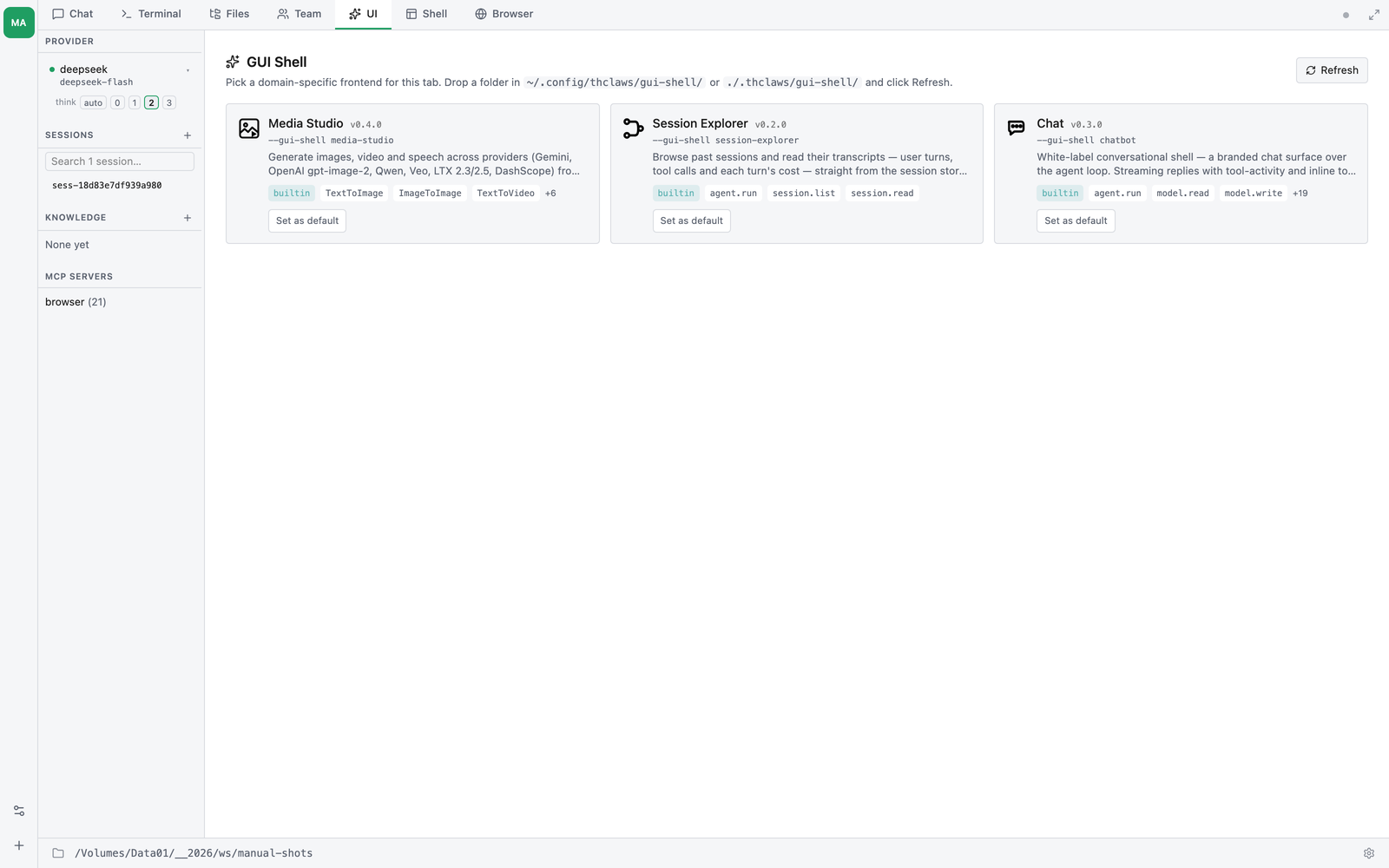
- ”+ New Tab” → “GUI Shell” opens a picker grid showing
every installed shell — built-ins, user-level (
~/.config/
   thclaws/gui-shell/
), and project-level (./.thclaws/gui-shell/). - Each card shows icon, name, version, source (
builtin/user/project), declared permissions, and any past sessions for that shell with one-click resume. - Click a card → the picked shell replaces the picker in the Shell
tab. Mode A is single-shell-at-a-time as of v0.24 — multi-instance
shell tabs are still pending in a later release. (Multi-tenant
--servefor hosting one shell to many users HAS shipped — see “Multi-tenant” below.) Use the “shells” breadcrumb to return to the picker and pick a different shell. - “Refresh shells” button rescans the discovery folders without restarting thClaws.
Setting a default shell
If you always want a specific shell to open when you click “New GUI
Shell”, set it in settings.json:
// ./.thclaws/settings.json  (project — wins)
// or ~/.config/thclaws/settings.json  (user — falls through)
{ "guiShell": "session-explorer" }
Long form, when desktop and serve defaults should differ:
{
  "guiShell": {
    "tabDefault":   "session-explorer",   // for Mode A "New Shell"
    "serveDefault": "my-image-bot"      // for Mode B --serve fallback
  }
}
The Media Studio shell (built-in)
thClaws ships three built-in shells — Session Explorer, Chatbot, and Media Studio. Media Studio is a point-and-click front end for the image & video tools (Chapter 11), so you can generate media without typing tool calls in chat.
Open it from the GUI Shell picker (media-studio), or pin it:
// ./.thclaws/settings.json
{ "guiShell": "media-studio" }
What it does:
- Mode switch — Text → Image, Image → Image (edit), Text → Video, Image → Video.
- Provider / model picker with a resolution control for video (720P / 1080P).
- Gallery of everything already in
output/(not just what you just generated) — click any item to set it as the source image for an Image → Image or Image → Video run; click to open it in the lightbox. - Async video is handled for you — the shell submits the job and
polls
MediaJobStatusuntil the clip is ready, then drops it in the gallery.
Media Studio auto-enables the media tools for its own session, so you
don’t have to set mediaToolsEnabled first — but you still need the
relevant provider key (GEMINI_API_KEY / OPENAI_API_KEY /
DASHSCOPE_API_KEY, see Chapter 11) in your environment or keychain.
Mode B — serve a shell over the cloud (Tier 2)
Use this to access a shell from a phone, share it with a teammate, or run it on a server.
Launch
thclaws --serve --gui-shell my-image-bot --port 8080
stdout:
Serving My Image Bot (v0.1.0) at
  https://localhost:8080/t/abc...xyz/
Token persisted to ~/.config/thclaws/gui-shell-tokens.json
Open that URL in any browser. A landing flash confirms
Connecting to: my-image-bot v0.1.0 on <host>, then the shell
renders as the entire page — same UI as Mode A, same bridge, just
WebSocket under the hood instead of Tauri IPC.
The token IS the credential
- The URL
https://host:8080/t/<token>/is everything you need. Anyone with it gets in; anyone without it gets a silent 404 (the server doesn’t even advertise that a shell is bound). - Token is generated on first launch and persisted in
~/.config/thclaws/gui-shell-tokens.jsonkeyed by(shellId, port). Restarting--servekeeps the same URL, so sharing it once is meaningful. - Direct URLs like
/gui-shell/session-explorer/or/shells/return 404. Only the shell launched with--gui-shellis reachable, and only through/t/<token>/.
Pinning the token (for deployments)
For k8s manifests or systemd units that need a stable URL:
thclaws --serve \
        --gui-shell my-image-bot \
        --gui-shell-token "$MY_TOKEN" \
        --gui-shell-token-ttl 90d \
        --port 8080
Rotating
If a URL leaks or you want to invalidate sharing:
thclaws shell rotate-token my-image-bot
# → prints the new URL, old URL stops working immediately
No-auth mode (localhost / intranet only)
thclaws --serve --gui-shell my-image-bot --gui-shell-no-auth
Routes mount at / directly — no /t/<token>/ prefix. By default
this refuses to bind on non-loopback addresses. To expose
unauthenticated on a public IP (you’d better know what you’re
doing — typically behind your own auth proxy):
thclaws --serve --gui-shell my-image-bot \
        --gui-shell-no-auth --gui-shell-no-auth-allow-public \
        --bind 0.0.0.0 --port 8080
The same guardrail pattern as --dangerously-skip-permissions
(Chapter 5).
Serve defaults from settings.json
If --gui-shell is omitted, the launcher reads
guiShell.serveDefault (or the shorthand guiShell if it’s a
string) from settings.json. If neither is set, --serve keeps its
current behaviour — serves the regular React frontend.
Multi-tenant — one shell, many users
Everything above (“Mode B”) is single-tenant: every visitor to the URL shares one agent + one session + one storage. That’s the right model when you’re sharing a shell with a teammate or running it for yourself from your phone.
When you want to host a shell for many users — each with their own
conversation, their own gui-shell storage, their own output files —
add --multi-tenant and a shared HMAC secret:
thclaws --serve --gui-shell my-image-bot \
        --multi-tenant \
        --multi-tenant-secret "$THCLAWS_CLOUD_HMAC_SECRET" \
        --port 8080
(The --multi-tenant-secret flag also accepts THCLAWS_CLOUD_HMAC_SECRET
from the environment, which is the common deployment pattern.)
This mode expects requests to arrive from a trusted routing layer (typically thClaws.cloud) that attaches three signed headers per request:
X-Thclaws-User:       <user_id>           # filesystem-safe, [a-zA-Z0-9_-], ≤64 chars
X-Thclaws-User-Ts:    <unix_seconds>
X-Thclaws-User-Proof: hex(HMAC-SHA256(secret, "<user_id>:<ts>"))
What you get:
- Separate agent + session per user — alice and bob hosted in the same pod see independent conversations.
- Per-user storage —
thclaws.storage.set("notes", …)from alice’s shell goes tousers/alice/storage/<shell>/…; bob’s goes tousers/bob/.... No collisions on the same key. - Per-user output — files the agent generates land at
output/users/<id>/...and the file-asset URL won’t serve another user’s subtree even if the URL is guessed. - LRU + idle eviction —
--multi-tenant-max-users 1000(default) and--multi-tenant-idle-timeout 30m(default) bound resource use. - Restart-resumable — alice’s session JSONLs survive pod restart; she reconnects and her prior conversation reloads from disk.
The shell author writes the same shell as for single-tenant Mode B — no code change required. The bridge automatically routes storage / file-asset calls through the per-user prefix.
This is what powers thClaws.cloud (dev-plan/34). For the full
contract — HMAC signing recipe, on-disk layout, registry semantics,
curl smoke recipe, what Tier 1 does NOT include (object storage,
cross-pod state portability, cgroup-style resource limits) — see
thclaws-technical-manual/multi-tenant-serve.md.
Installing a custom shell (Tier 2)
A shell is just a folder. Drop it in one of two places:
~/.config/thclaws/gui-shell/<id>/      # cross-project, every workspace sees it
./.thclaws/gui-shell/<id>/              # repo-scoped, project override by id
The folder must contain:
<id>/
  manifest.json         # see below
  index.html            # entry point — the bridge is injected at serve time
  ...                   # any CSS / JS / images / fonts
Minimum manifest.json:
{
  "id": "hello-shell",
  "name": "Hello Shell",
  "version": "0.1.0",
  "description": "Smallest possible shell.",
  "entry": "index.html",
  "icon": "icon.svg",
  "minBridgeVersion": "1",
  "permissions": ["agent.run"]
}
Then in the GUI: open the picker, click “Refresh shells” — your shell appears alongside the built-ins.
Project shell overrides a user shell with the same id. Useful when a team wants to ship a customised version of a public shell to everyone in the repo.
Tier 3 — install from a git URL
thclaws shell install https://github.com/someone/cool-shell
thclaws shell install ./mything --scope project   # default scope: user
thclaws shell list
thclaws shell remove cool-shell
On first install, a permission prompt summarises what the shell declares it needs:
“This shell wants to: run the agent, invoke
mcp__pinn_ai__text2image, store data in<shell-root>/state/, read your sessions. Allow?”
Grants are persisted at ~/.config/thclaws/gui-shell-grants.json
(user-scoped — a teammate cloning the repo doesn’t inherit your
trust decision). Revoke from the picker’s context menu, or via
thclaws shell remove.
Authoring your own shell (Tier 3)
A shell is HTML + CSS + JS. No build step required.
Starter template
thclaws shell new dashboard ./my-shell     # scaffold from a template
thclaws shell preview ./my-shell           # serve it with hot reload
shell new takes a template id — chat-enhanced, grid, form,
dashboard, kanban, document, or report — and writes a working
shell into the destination folder (refused if the folder is non-empty,
unless you pass --force).
shell preview runs the shell against a mock agent on
http://localhost:<port>/, reloading on save, so you can build the UI
without spending tokens. --port 0 picks a free port.
The rest of the authoring commands:
| Command | What it does |
|---|---|
thclaws shell check <path> |
Lint the folder. Warnings and errors; exits 1 on any error |
thclaws shell pack <path> |
Bundle into a single-file HTML, inlining siblings |
thclaws shell login / logout |
Authenticate for publishing |
thclaws shell publish <path> |
Publish the shell |
Two manifest filenames, and they are not interchangeable. The authoring commands (
new/preview/check/pack/publish) readshell.json. The runtime registry — what makes a shell show up in the picker — discovers folders bymanifest.json. A shell that lints clean but never appears in the picker is usually this: it has ashell.jsonand nomanifest.json.
The bridge — window.thclaws.*
Your shell’s JavaScript gets exactly one global. Everything is async.
// Identity
thclaws.shell.id          // "hello-shell"
thclaws.shell.sessionId   // session this tab is bound to
thclaws.transport         // "tauri" (Mode A) or "ws" (Mode B)

// Run the agent — same loop that powers Chat/Terminal
const { runId } = await thclaws.run("Summarise this in one line.");

// Cancel an in-flight turn (equivalent of Cmd+. in Chat)
thclaws.cancel(runId);

// Subscribe to streaming events. on() returns an unsubscribe function.
const unsubscribe = thclaws.on("text", (chunk) => render(chunk));
thclaws.on("ready",       ()        => …);   // bridge ready (Mode A)
thclaws.on("tool_call",   (call)   => …);   // Tier 2
thclaws.on("tool_result", (result) => …);   // Tier 2
thclaws.on("done",        ()        => …);
thclaws.on("error",       (err)     => …);

// Or consume a turn as an async stream (sugar over run() + on()).
for await (const ev of thclaws.streamTurn("Summarise this.")) {
  if (ev.type === "text") render(ev.delta);
  else if (ev.type === "tool_call") showSpinner(ev.label);
}

// Direct tool invocation — bypass the agent loop for deterministic actions.
// callTool() is the name to target going forward; tools.invoke() is the
// older alias and behaves identically. `<name>` is whatever tool you've
// registered — typically an MCP tool like `mcp__pinn_ai__text2image`
// (sanitised from the server name) or a built-in like `Ls`. Read-only
// tools work directly; mutating tools (Bash/Write/Edit/…) reject with
// "requires approval". Prefer thclaws.run() + an AGENTS.md playbook for
// most shells — it composes with whatever provider stack the user has
// configured. See the Image Generator example shell.
const result = await thclaws.callTool("mcp__your_server__your_tool", { … });

// Turn an agent-produced file path into a URL the browser can load —
// e.g. <img src={thclaws.fileUrl(payload.file)}>. Mode B accepts a path
// relative to the shell's project root; Mode A needs an absolute path
// (returns null otherwise).
const src = thclaws.fileUrl("output/diagram.svg");

// Per-shell, per-session storage
// (Tier 2; file-backed at <shell-root>/state/<sessionId>.json)
await thclaws.storage.set("last_query", query);
const last = await thclaws.storage.get("last_query");
await thclaws.storage.set("last_query", null);  // delete by writing null

// Host UI integration — theme + full-screen. The bridge also mirrors the
// host theme onto document.documentElement[data-theme] + color-scheme,
// so most shells can theme in CSS alone and never touch these.
thclaws.ui.theme            // "light" | "dark" (host's resolved theme)
thclaws.ui.isFullscreen     // true while the host shows this shell full-screen
thclaws.ui.onTheme((t)   => repaint(t));         // fires immediately + on change
thclaws.ui.onFullscreen((active) => {            // fires immediately + on change
  myExitButton.hidden = !active;
  if (active) thclaws.ui.claimExitControl();     // hide host's fallback exit chip
});
myExitButton.onclick = () => thclaws.ui.exitFullscreen();
Any bridge call the host can’t answer self-rejects after 15 minutes, so a shell never hangs on a dropped reply.
The rest of the bridge
The block above is what most shells need. Beyond it, the bridge exposes the app’s own settings surfaces, each behind its own permission — a shell can be a control panel, not only a chat front-end. Everything is async, and anything not declared in the manifest throws at call time.
| Namespace | Methods | Permission |
|---|---|---|
thclaws.sessions |
list() · load(id) · new() · rename(id, title) · delete(id) |
session.list to list, session.read to load, session.write for the rest |
thclaws.model |
get() · list() · set(id) · onChange(cb) · current |
model.read / model.write |
thclaws.mode |
get() · set(mode) — the permission mode (Chapter 5) |
mode.write (both) |
thclaws.memory |
getCore() · setCore(text) |
memory.read / memory.write |
thclaws.kms |
list() · browse(name) · create(name) · ingest(kms, path) |
kms.read / kms.write |
thclaws.research |
list() · get(id) |
research.read |
thclaws.schedule |
list() · create(prompt, cron) · delete(id) · setEnabled(id, on) |
schedule.read / schedule.write |
thclaws.heartbeat |
get() · set(interval) |
schedule.read / schedule.write |
thclaws.skills |
list() · get(name) · install(url, opts) · save(name, body) · delete(name) |
skills.read / skills.write |
thclaws.plugins |
list() · install(url, opts) · setEnabled(name, on) · remove(name) |
plugins.read / plugins.write |
thclaws.connectors |
list() · add({name, url, headers}) · remove(name) — MCP servers, HTTP only |
connectors.read / connectors.write |
thclaws.llm |
complete({prompt, system, maxTokens}) — one model call, no agent loop, no tools |
llm.complete |
thclaws.keys |
set(provider, key) — write-only, there is no getter |
keys.write |
thclaws.profile |
get() |
— |
thclaws.permissions |
list() · has(action) — ask what you were granted |
— |
Two of these deserve a second look before you declare them.
keys.write lets a shell write a provider API key into the user’s
config; it is write-only by design, so a shell can help someone set a
key up but can never read one back. And connectors.write lets a shell
register an MCP server, which is a way to add tools to the user’s
agent — declare it only if that is genuinely what your shell is for.
thclaws.llm.complete is the escape hatch for the case where you want
the model but not the agent: no tools, no approvals, no session
history — just a completion. Use thclaws.run() when you want the real
agent loop.
The bridge is the only API. Shells cannot reach the workspace
filesystem, the network (unless network.outbound:<host> is
declared in Tier 3), or any other shell’s storage. Two shells’
storage namespaces are isolated by id.
Permissions (Tier 3)
Declare what your shell does in manifest.json::permissions:
| Permission | Allows |
|---|---|
agent.run |
thclaws.run() and event subscription |
tools.invoke:<name> |
direct thclaws.callTool("<name>", …) / thclaws.tools.invoke(…) per tool |
session.read / session.list |
read sidecar session data |
fs.shell-scoped |
read/write inside the shell’s resolved root |
network.outbound:<host> |
fetch() to that host (CSP injected at serve time) |
approval.inline |
the shell renders its own approve/deny widget (thclaws.approvals.*) instead of the system modal |
model.read / model.write |
thclaws.model.* — see / switch the model |
mode.write |
thclaws.mode.* — read or change the permission mode |
memory.read / memory.write |
thclaws.memory.* — the core memory text |
kms.read / kms.write |
thclaws.kms.* — browse, create, ingest |
research.read |
thclaws.research.* — research jobs |
schedule.read / schedule.write |
thclaws.schedule.* and thclaws.heartbeat.* |
skills.read / skills.write |
thclaws.skills.* — list, install, edit, delete skills |
plugins.read / plugins.write |
thclaws.plugins.* |
connectors.read / connectors.write |
thclaws.connectors.* — register MCP servers |
llm.complete |
thclaws.llm.complete() — a bare model call |
keys.write |
thclaws.keys.set() — write a provider API key (no read) |
session.read / session.list / session.write |
thclaws.sessions.* |
Declaring any tools.invoke:<name> restricts the shell to just those
tools (tools.invoke:* = all); declaring none leaves it unrestricted.
Users see this list before installing. Anything not declared throws at call time.
Linting
thclaws shell check ./my-shell
# checks: manifest valid, entry exists, permissions sensible,
# no Tauri-only APIs that would break in Mode B, no external links
# that would leak the serve token via Referer.
Exits 1 if anything is an error, so it drops straight into CI or a
pre-commit hook. (Older notes call this shell doctor; the command is
check.)
Sessions and persistence
A shell session is a normal thClaws session. Same JSONL format,
same location (./.thclaws/state/sessions/<id>.jsonl), same --resume
machinery. The only addition is an optional shell: { id, version }
field on the session header — non-shell sessions write byte-
identical JSONL to before, so cat still works on everything.
# Look at a shell session like any other
cat ./.thclaws/state/sessions/sess-abc123.jsonl | head -3
# {"type":"header","id":"sess-abc123","shell":{"id":"image-generator","version":"0.1.0"},…}
# {"type":"user","content":"generate a picture of a sunset"}
# {"type":"assistant","content":[…]}
Closing a shell tab persists the session. Reopening from the
picker’s “Past sessions” sub-list resumes it. A session stamped
with a shell.id only opens in that shell — there is no
generic-chat fallback view in v1 (it’s a Tier 3+ open question).
Cost awareness
A shell that calls thclaws.run() consumes the same tokens as a
Chat-tab turn. A shell that calls thclaws.tools.invoke()
directly skips the agent loop entirely — no model tokens for that
call, just the tool’s own cost (e.g. image-generation provider
charges).
In Tier 3, manifests can declare a daily token budget and the
permission prompt surfaces it (“Allow up to 50k tokens/day?”). The
existing budget accounting tracks usage; over-budget shells get a
rejected promise from thclaws.run().
Known gaps
Everything the earlier tier plan listed as missing has shipped — the picker, custom shells, the wide bridge surface, serve mode, enforced permissions, and the authoring CLI are all documented above. What is still worth knowing:
shell.jsonvsmanifest.json. The authoring CLI and the runtime registry read different filenames (see above). Until they converge, a shell you intend to both develop and install locally needs both.- Mode B is the whole shell, not one tab.
--serve --gui-shellexposes that shell and nothing else; there is no way to serve the picker itself. - No live worker/agent grid. Shell UIs render agent output as it streams, but there is no built-in dashboard of concurrent runs.
Security model — what each mode actually protects
- Mode A iframe sandbox — every shell runs inside an
<iframe
  sandbox="allow-scripts allow-same-origin">
. A buggy shell that callsdocument.location = "…"cannot navigate the parent GUI away. Per-shell origin separation (subdomain in the custom protocol) prevents two shells from reading each other’s cookies / localStorage. - Mode B token-in-path — 160-bit per-shell tokens. Silent 404
on missing/wrong tokens (no auth challenge advertised). Per-IP
rate limit on token-prefix attempts. Referer stripping
(Permissions-Policy header +
<meta name="referrer">) to prevent token leakage when the shell links externally. - Path traversal — both modes call the same
Sandbox::check_in
  (&shell_root, &rel)
helper. URL-decoded..sequences collapse via lexical normalize → canonicalize →starts_withcheck. - Tool invocation — Tier 3 permission gating means a shell
cannot call a tool it didn’t declare. Permission grants are per
shell per user, stored in
~/.config/thclaws/gui-shell-grants
  .json
, revocable from the picker.
What is not protected:
- The shell author. You’re trusting their code with your agent session. There is no marketplace verification in v1; Tier 3 adds the marketplace catalog kind but governance ultimately depends on who you install from.
- Network exposure of
--gui-shell-no-auth-allow-public. The flag is named that way for a reason — read Chapter 5 first.
Quick reference
| Goal | Command / location |
|---|---|
| Try Session Explorer now (Tier 1) | thClaws GUI → New Tab → Open Session Explorer |
| Open the shell picker (Tier 2) | thClaws GUI → New Tab → GUI Shell |
| Set default shell for “New Shell” | "guiShell": "<id>" in settings.json |
| Install someone’s shell (manual) | drop folder in ~/.config/thclaws/gui-shell/<id>/ → Refresh |
| Install from git (Tier 3) | thclaws shell install <git-url> |
| Serve a shell over HTTP (Tier 2) | thclaws --serve --gui-shell <id> --port 8080 |
| Pin the serve URL | add --gui-shell-token <token> |
| Rotate compromised URL | thclaws shell rotate-token <id> |
| List installed shells (Tier 3) | thclaws shell list |
| Develop a new shell (Tier 3) | clone template, make dev |
| Remove a shell (Tier 3) | thclaws shell remove <id> |
| Look at a shell session | cat ./.thclaws/state/sessions/<id>.jsonl |
Troubleshooting
“Shell tab is blank / spinner forever” — open the WebView
devtools (THCLAWS_DEVTOOLS=1 thclaws) and check the iframe’s
console. Common causes: shell’s index.html has a strict CSP that
blocks the injected bridge script (Tier 3 adds a manifest
cspMode: "managed" field); shell’s JS throws before calling
thclaws.on() so no events ever bind.
“Mode B URL returns 404” — confirm the URL includes the
/t/<token>/ prefix and trailing slash. The token is printed to
the launcher’s stdout; if you lost it, check
~/.config/thclaws/gui-shell-tokens.json. URLs without the token
404 by design (no auth challenge advertised).
“Shell can’t call a tool” — Tier 3: manifest didn’t declare
tools.invoke:<name>. Add it, restart thClaws (or Refresh
shells), re-approve the new permission.
“Two shells share storage” — they shouldn’t. Confirm they have
distinct manifest.json::id values; storage is namespaced by
id. If the ids are different and storage still leaks, file a bug —
that’s a sandbox failure.
“Headless serve refuses to start with --gui-shell-no-auth“ —
intended. --gui-shell-no-auth only allows loopback binds; add
--gui-shell-no-auth-allow-public and re-confirm you have your
own auth in front of it.
“Sandbox::check_in rejected my asset” — the path resolved
outside the shell’s folder. Usually a relative URL with too many
../ in it, or a symlink pointing outside. Both modes apply the
same check — if it fails in the desktop tab, it’ll fail in serve
mode for the same reason.