
Chapter 7 — Sessions
A session is one persistent conversation between you and thClaws. It holds:
- The full message history (user prompts, assistant responses, tool calls)
- The model and provider in use
- A creation date, working directory, and optional human-readable title
- Token usage accumulated over the conversation
Sessions are stored as append-only JSONL files — one event per line. That makes them easy to inspect, diff, and recover from partial writes.
Where sessions live
Sessions are project-scoped — they live at ./.thclaws/state/sessions/
inside your working directory. Start thClaws in a fresh folder and you
get an empty session list.
In the desktop app a workspace can hold several agents, and each keeps its
own sessions in its own folder: .thclaws/bots/<agent>/.thclaws/state/sessions/
(the first agent is main). Your files, memory and project KMSes stay at the
workspace root and are shared.
Each session is a single .jsonl file named by its ID — a short hex
string derived from the nanosecond wall-clock at creation (e.g.
sess-181a2c7f4e3d5). It can be inspected, moved, emailed, or
committed like any text file.
Legacy user-scope sessions at ~/.local/share/thclaws/sessions/ or
~/.claude/sessions/ (from older thClaws / Claude Code installs) are
left alone — move them into a project’s .thclaws/state/sessions/ if you
want them to show up in /sessions.
Auto-save
Every assistant response is flushed to the session file as it lands. You don’t need to explicitly save. If thClaws crashes mid-response, the session file still has everything up to the last completed event.
/save — force-save with no side effects
❯ /save
saved → ./.thclaws/state/sessions/s-4f3a2b1c.jsonl
/save forces a flush. Useful before running risky commands so you know the on-disk file matches memory.
Normally you don’t need to call this.
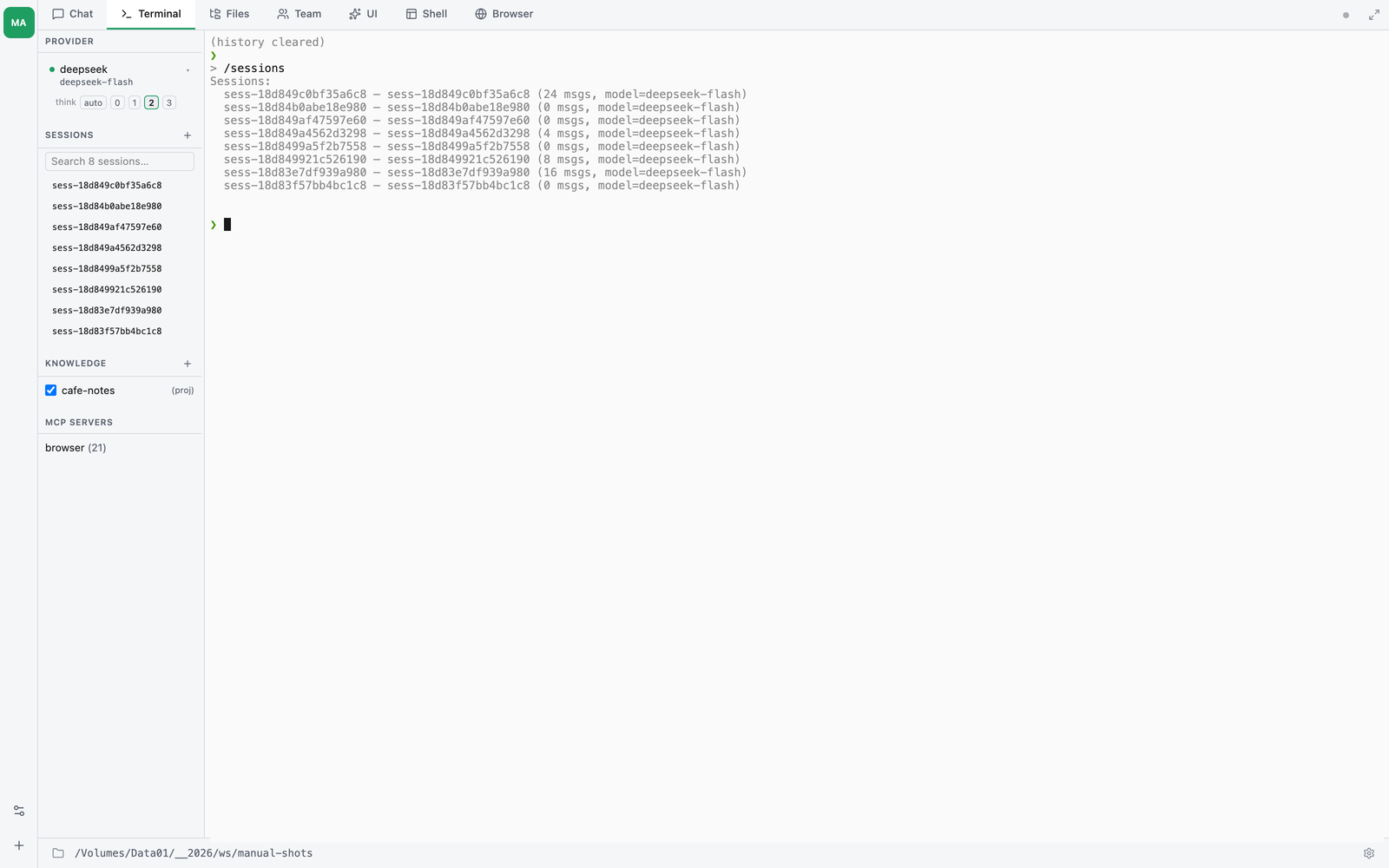
/sessions — list saved sessions
❯ /sessions
  s-4f3a2b1c · claude-sonnet-4-6 · 23 msg
  refactor-auth · claude-sonnet-4-6 · 87 msg
  s-9a8b7c6d · gpt-4o · 12 msg
Lists up to 20 most recent sessions. Titled sessions show the title; untitled ones show the UUID.
/load — resume a session by ID or name
❯ /load s-4f3a2b1c
loaded s-4f3a2b1c (23 message(s))

❯ /load refactor-auth
loaded refactor-auth (s-9a8b7c6d) (87 message(s))
Takes either a full session ID (UUID prefix is fine) or a title (exact match). Replaces the current agent history with the loaded messages, so subsequent turns continue from where the old session left off.
/rename — give a session a human-readable title
❯ /rename refactor-auth
session renamed → refactor-auth

❯ /rename
session title cleared
A titled session is easier to find via /load or in the sidebar. Pass no argument to clear the title and go back to the UUID.
Rename events are appended to the same JSONL file as a {"type":"rename", "title": "..."} record, so the title travels with the session.
Sidebar (GUI)
The sidebar’s Sessions section lists the last 10 sessions, titled ones first. Each row has:
- Click → load session
- Pencil icon (appears on hover) → rename session (inline browser prompt)
+in the section header → start a new session (auto-saves the current one first)
--resume — CLI flag for scripts
When launching from a shell, you can resume a specific session or the latest one without entering the REPL first:
# Resume a specific session by ID or title
thclaws --resume refactor-auth

# Resume whatever session was active most recently
thclaws --resume last
If the session isn’t found you get a friendly warning and thClaws starts fresh.
New sessions — when they’re created
A new session spawns automatically when:
- You launch thClaws from scratch (no
--resume) - You click the
+button in the sidebar’s Sessions section -
You run
/fork(or press Fork with summary on the banner) — like+, except the new session is seeded with a summary of the old history instead of starting empty -
You run
/provider <name>— this still forks. A freshAgentis built for the new provider and the old history is not carried over.
/model is the exception, and it changed. Switching model keeps the
same session: the JSONL log is the canonical history and whichever
provider serves the next turn translates it, so the session id and file
stay put and the confirmation reads conversation preserved in session
…. Earlier versions forked on every model switch; that is retired.
/provider still forks, because changing provider replaces the whole
agent rather than relabelling the active one.
The previous session auto-saves before any of the above, so nothing is lost.
Compaction: how big sessions stay manageable
Long sessions eventually bump against the provider’s context window. thClaws’ agent loop runs compaction before every turn:
- Estimate token count of the current history
- If it exceeds
budget_tokens(default 100,000), compress older messages into a summary - Keep recent turns verbatim; older tool results are replaced by “[tool result: N bytes, truncated to preview]” with the full content saved to disk
You don’t configure this — it happens automatically. Compacted turns are still on disk in the original JSONL, so you can inspect full history after the fact.
Force compaction early (e.g. before a context-heavy task) with /compact.
Sessions and the GUI Chat tab
The Chat tab and the Terminal tab share the active session. Loading a session in the sidebar updates both tabs. Ending a turn in one shows up in the other. Internally they’re both clients of the same Agent instance.
Inspecting sessions on disk
Sessions are plain JSONL. Peek with:
cat .thclaws/state/sessions/s-4f3a2b1c.jsonl | head -5
First line is a header: {"type":"header","id":"s-4f3a2b1c","model":"claude-sonnet-4-6","cwd":"...","created":"..."}. Subsequent lines are messages and events.
Valid event types you’ll see:
{"type":"header", ...}— once, at the top{"type":"message", "role":"user"|"assistant", "content":[...]}— actual turns{"type":"rename", "title":"..."}— a rename happened{"type":"plan_snapshot", ...}/{"type":"goal_snapshot", ...}— sidebar state checkpoints (latest wins on load){"type":"compaction", ...}— compaction checkpoint that supersedes precedingmessageevents{"type":"provider_state", "provider_session_id": "uuid-..."}— provider-side conversation id (anthropic-agent only — see below)
Resuming anthropic-agent sessions
The anthropic-agent provider (Anthropic Agent SDK subprocess; chosen by claude-sonnet-4-6@agent-sdk and friends) keeps its own server-side conversation indexed by a UUID it returns on the first response. thClaws captures that UUID and persists it as a provider_state event in the session JSONL, so the next time you /load or /resume that session the provider gets the UUID back via Provider::set_provider_session_id and the next turn passes --resume <uuid> to the subprocess. The SDK restores its server-side history and the model sees the full prior conversation.
Pre-fix this hop was missing: the UUID lived only in memory, so closing thClaws and reopening it caused the SDK to start a brand-new conversation that saw only the most recent user message — the model appeared to have forgotten everything. If you’ve used a build older than this fix and the resume feels broken, start a fresh session.
The UUID is not shared with other providers. Switching from anthropic-agent to claude/anthropic, OpenAI, Gemini, etc. forks a new session anyway (per the rule above), so no cross-provider state leaks.
Sharing or archiving a session
A session file is self-contained — you can email / commit / move it. Copy it into another machine’s sessions directory and it will appear in /sessions and the sidebar.
Redact sensitive content by editing the JSONL directly before sharing; each line is standalone so removing one won’t corrupt the rest.
Chapter 8 covers the longer-term knowledge sibling to sessions: persistent memory and project instructions via AGENTS.md.