
Chapter 6 — Providers, models & API keys
thClaws talks to thirty-one providers, auto-detected from the model name.
Switch any time with /model, /provider, or by clicking the provider/model
chip in the sidebar (Desktop GUI, v0.7.2+).
Provider overview
| Provider | Model prefix | Auth env var | Notes |
|---|---|---|---|
| Moonshot | moonshot/* |
MOONSHOT_API_KEY |
Moonshot AI (Kimi); moonshot/kimi-k2.6 default |
| xAI | xai/* |
XAI_API_KEY |
xAI Grok; xai/grok-4.3 default |
| Groq | groq/* |
GROQ_API_KEY |
Groq LPU (very fast); groq/llama-3.3-70b-versatile default |
| TokenRouter | tokenrouter/* |
TOKENROUTER_API_KEY |
Unified router to 300+ models (tokenrouter/<vendor>/<model>) |
| AtlasCloud | atlascloud/* |
ATLASCLOUD_API_KEY |
Hosted OpenAI-compatible router; atlascloud/qwen/qwen3.5-flash default |
| Unifically | unifically/* |
UNIFICALLY_API_KEY |
Hosted OpenAI-compatible router; unifically/google/gemini-3.5-flash default |
| Meta | meta/* |
META_API_KEY |
Meta’s hosted API; meta/muse-spark-1.2 default |
| 9router | 9router/* |
NINEROUTER_API_KEY |
Self-hosted router — set NINEROUTER_BASE_URL (default http://localhost:20128/v1); the base URL is editable in Settings |
| Anthropic | claude-* |
ANTHROPIC_API_KEY |
Extended thinking, prompt caching (system + tools) |
| Anthropic Agent SDK | agent/* |
— (uses Claude Code’s own auth) | Drives the claude CLI under your Claude Pro / Max subscription instead of API billing. v0.9.6 added an in-process MCP bridge so the model gets thClaws’s tool registry (KMS, Memory, MCP-contributed, Bash, Edit, …) in addition to Claude Code’s built-ins — no need to switch to claude-* for tool parity. Task / Team / Skill / Plan / AskUserQuestion are intentionally not bridged. |
| OpenAI | gpt-*, o1-*, o3*, o4-* |
OPENAI_API_KEY |
Chat Completions; automatic prompt caching |
| OpenAI Responses | codex/* |
OPENAI_API_KEY |
Responses API — newer agentic-native shape |
| ChatGPT Codex | chatgpt-codex/* |
— (OAuth via Codex CLI) | Runs Codex models against chatgpt.com/backend-api/codex/responses, billed against your ChatGPT Plus/Pro/Team subscription instead of a paid OpenAI API key. Auth is auto-imported from the official Codex CLI’s ~/.codex/auth.json (run codex login once). Default chatgpt-codex/gpt-5.4. Added in v0.9.5 |
| OpenAI-Compatible | oai/* |
OPENAI_COMPAT_API_KEY (+ OPENAI_COMPAT_BASE_URL) |
Generic OAI-compat endpoint — point at any LiteLLM/Portkey/Helicone/vLLM/internal-proxy that speaks /v1/chat/completions; oai/ prefix stripped before forwarding |
| OpenRouter | openrouter/* |
OPENROUTER_API_KEY |
Unified gateway to 300+ models across every major LLM vendor |
| OpenCodeGo | opencode-go/* |
OPENCODE_GO_API_KEY |
opencode.ai subscription gateway. Single base URL serves three wire shapes (OpenAI-compatible for GLM/Kimi/DeepSeek/MiMo, Anthropic-compatible for MiniMax M2.x, Alibaba-compatible for Qwen3.x Plus); the provider auto-routes by model id. Added in v0.9.6 |
| Gemini | gemini-*, gemma-* |
GEMINI_API_KEY |
Gemma served via Google AI Studio |
| Ollama | ollama/* |
— (local) | NDJSON streaming; no auth |
| Ollama Anthropic | oa/* |
— (local, v0.14+) | Ollama’s Anthropic-compatible /v1/messages endpoint |
| DashScope | qwen-*, qwq-* |
DASHSCOPE_API_KEY |
Alibaba Qwen mainland endpoint (dashscope.aliyuncs.com); automatic caching |
| QwenCloud | qc/* |
QWENCLOUD_API_KEY (+ QWENCLOUD_BASE_URL) |
Alibaba DashScope Singapore region (dashscope-intl.aliyuncs.com). Same Qwen catalogue as DashScope but lower latency from outside mainland China. qc/ prefix stripped on the wire so the upstream sees the bare qwen-* id. Added in v0.9.0 |
| DeepSeek | deepseek-* |
DEEPSEEK_API_KEY (+ DEEPSEEK_BASE_URL) |
V4 line: deepseek-v4-flash, deepseek-v4-pro. Older aliases deepseek-chat / deepseek-reasoner still work as wire-level aliases |
| ThaiLLM (NSTDA) | thaillm/* |
THAILLM_API_KEY |
Aggregator at thaillm.or.th for four 8B Thai-tuned models (OpenThaiGPT, Typhoon-S, Pathumma, THaLLE). Aliases (case-insensitive): openthaigpt, typhoon, pathumma, thalle |
| Z.ai | zai/* |
ZAI_API_KEY (+ ZAI_BASE_URL) |
GLM Coding Plan endpoint at api.z.ai. Default zai/glm-5.2. Override ZAI_BASE_URL for the general BigModel SKU at open.bigmodel.cn |
| MiniMax | minimax/* |
MINIMAX_API_KEY (+ MINIMAX_BASE_URL) |
International endpoint at api.minimax.io. Models: minimax/MiniMax-M3 (flagship, default), minimax/MiniMax-M1 (1M context), minimax/abab7-chat-preview. China-platform users on api.minimax.chat need to override MINIMAX_BASE_URL (different auth scheme — YMMV). Added in v0.8.5 |
| Ollama Cloud | ollama-cloud/* |
OLLAMA_CLOUD_API_KEY |
Hosted Ollama catalog (Kimi, GPT-OSS, DeepSeek, Llama, etc.). OpenAI-compatible at ollama.com/v1 |
| NVIDIA NIM | nvidia/* |
NVIDIA_API_KEY (+ NVIDIA_BASE_URL) |
NVIDIA hosted inference at integrate.api.nvidia.com/v1. Catalog spans Nemotron, Llama, DeepSeek, GLM and more — the nvidia/ prefix routes everything; the outer prefix is stripped on the wire. Override the env var for on-prem NIM deployments |
| LMStudio | lmstudio/* |
— (local) | LMStudio’s local OpenAI-compatible server at localhost:1234/v1. No auth. Models follow whatever’s loaded in the LMStudio app |
| vLLM | vllm/* |
— (self-hosted, + VLLM_BASE_URL) |
vllm serve at localhost:8000/v1. No auth unless started with --api-key. The id after the prefix is the served id (often an HF path — vllm/Qwen/Qwen3-8B); /models lists the one it’s actually serving |
| llama.cpp | llamacpp/* |
— (self-hosted, + LLAMACPP_BASE_URL) |
llama-server at localhost:8080/v1. No auth. Serves one GGUF per process and ignores the request’s model field, so any id after the prefix works |
| LiteLLM | litellm/* |
LITELLM_API_KEY (optional) (+ LITELLM_BASE_URL) |
Self-hosted LiteLLM proxy at localhost:4000/v1. Ids are your own model_name aliases from config.yaml (litellm/gpt-4o-mini, litellm/azure/prod-gpt4); /models lists them live and /model/info supplies the real context window. The key is only needed when the proxy runs with a master_key or virtual keys |
| Azure AI Foundry | azure/<deployment> |
AZURE_AI_FOUNDRY_API_KEY (+ AZURE_AI_FOUNDRY_ENDPOINT) |
Anthropic-Messages-shaped Azure deployments. <deployment> is your Azure-side deployment name (no defaults — set per subscription) |
The default on first run is claude-sonnet-4-6; change it with
--model on the command line or persist in settings.json.
Switching providers
❯ /providers
  * anthropic     → claude-sonnet-4-6
    anthropic-agent → agent/claude-sonnet-4-6
    openrouter    → openrouter/anthropic/claude-sonnet-4-6
    ...

❯ /provider openai
provider → openai (model: gpt-4o, saved to .thclaws/settings.json; new session sess-…)

❯ /provider
current provider: openai (model: gpt-4o)
Switching always forks a fresh session (see Chapter 7) — the old conversation is saved, a new one starts with the new provider.
Switching models
/model takes the full model id or a short alias:
| Alias | Resolves to |
|---|---|
sonnet |
claude-sonnet-4-6 |
opus |
claude-opus-4-6 |
haiku |
claude-haiku-4-5 |
flash |
gemini-2.5-flash |
openthaigpt |
thaillm/OpenThaiGPT-ThaiLLM-8B-Instruct-v7.2 |
typhoon |
thaillm/Typhoon-S-ThaiLLM-8B-Instruct |
pathumma |
thaillm/Pathumma-ThaiLLM-qwen3-8b-think-3.0.0 |
thalle |
thaillm/THaLLE-0.2-ThaiLLM-8B-fa |
The last four are the NSTDA Thai LLM models — /model typhoon is a lot
easier to type than the full id.
❯ /model sonnet
(alias 'sonnet' → 'claude-sonnet-4-6')
model → claude-sonnet-4-6 (saved to .thclaws/settings.json; new session sess-…)

❯ /models
  claude-haiku-4-5
  claude-opus-4-6
  claude-sonnet-4-6
  ...
/model validates the name against list_models before committing.
A typo like /model gemma4-9999 leaves the current model in place and
prints unknown model '…' — try /models.
/models lists the server’s reported catalogue for the current
provider. For prefixed providers (Ollama, Moonshot, Groq, …), IDs come
back prefixed (e.g. ollama/llama3.2, moonshot/kimi-k2.6) so you can paste them straight
into /model.
Thinking level — one knob for every provider
Every provider spells “how hard should the model think” differently:
Anthropic takes a token budget, OpenAI o-series/gpt-5 take a
reasoning_effort, DeepSeek and GLM have an on/off switch, Qwen has
enable_thinking + a budget, Gemini 2.5 takes a budget and Gemini 3 a
thinkingLevel, Ollama takes think: true|false. thClaws collapses all
of that into one level you set once:
| Level | Meaning | Anthropic | OpenAI o*/gpt-5 | DeepSeek / GLM | Qwen (hybrid) | Gemini 2.5 flash / pro | Gemini 3 | Ollama |
|---|---|---|---|---|---|---|---|---|
0 off |
fastest, no reasoning | no thinking block | minimal / low |
disabled |
off | budget 0 / 128 | low |
think: false |
1 low |
short reasoning | 2 048 tokens | low |
enabled | on, 2 048 | 2 048 | low |
think: true |
2 medium |
balanced | 10 000 | medium |
enabled | on, 10 000 | 10 000 | high |
think: true |
3 high |
deepest | 32 000 | high |
enabled | on, 32 000 | 24 576 / 32 000 | high |
think: true |
auto |
provider default — nothing is sent |
Set it either way:
- Sidebar — the
think auto 0 1 2 3pills under the model chip. /thinking 0…/thinking 3,/thinking auto, or a raw/thinking 12000budget for Anthropic-style providers.
Both paths persist to thinkingBudget in .thclaws/settings.json, so
the level follows the workspace, not the session. Models without a
known knob (gpt-4o, Qwen-Max, most local models) get no extra field
and keep behaving as before; a level is never sent to a model that
would reject it.
Frontier models still decide how much of a budget to use: on Anthropic
and Gemini the budget is a cap, and the model spends less on an easy
turn. off is the one setting that changes behaviour sharply — on
DeepSeek v4 it is the difference between ~90 s and ~4 s for a
long extraction prompt, which is why /research runs its worker calls
(digest, plan, notes) at off regardless of your chat setting.
Reasoning / “thinking” models
Models in the families below emit a reasoning_content field
alongside their normal content, and the provider requires the
prior reasoning_content to be sent back on every subsequent turn —
otherwise the API rejects with HTTP 400 “The reasoning_content in the
thinking mode must be passed back to the API”.
thClaws handles this transparently: it captures the reasoning into a
hidden Thinking content block on the assistant message, and on the
next request echoes it back only for providers that need it.
| Family | Example model id | Provider |
|---|---|---|
| DeepSeek v4 | deepseek-v4-flash, deepseek-v4-pro (native) · deepseek/deepseek-v4-* (OpenRouter) |
DeepSeek, OpenRouter |
| DeepSeek r1 | deepseek-reasoner (native) · deepseek/deepseek-r1, deepseek-r1 |
DeepSeek, OpenRouter |
| OpenAI o-series | openai/o1-mini, openai/o3, openai/o4-* |
OpenRouter |
For everything outside those families (gpt-4o, claude-sonnet-4-6,
qwen3.6-plus, etc.) the Thinking block is dropped during
serialization — no extra input tokens, no risk of the provider
rejecting an unknown field.
If you switch from a thinking model to a non-thinking model mid-session, the prior reasoning blocks stay in your session JSONL but don’t go on the wire. No token leak.
For contributors — make catalogue
If you build from source and want to refresh the bundled
model_catalogue.json (the compile-time baseline that ships with the
binary), the workspace Makefile has a target:
make catalogue
It pulls the model lists from OpenRouter (always, no key required)
plus Anthropic / OpenAI / Gemini if their API keys are set, plus
Ollama if reachable at localhost:11434, and merges into the
catalogue insert-only (hand-curated rows are never overwritten).
The report shows new IDs added per provider plus counts of unchanged +
skipped (no context_length) entries, then prints git diff --stat so
you can review before committing.
API key hierarchy
Keys are never stored in settings.json. thClaws looks in four
places, highest priority wins:
| Level | Location | Scope |
|---|---|---|
| Shell export | ~/.zshrc, CI env, etc. |
Every process |
| OS keychain | macOS Keychain / Windows Credential Manager / Linux Secret Service | Every thClaws session on this machine |
User .env |
~/.config/thclaws/.env |
Every thClaws session |
Project .env |
./.env in the working directory |
This project only |
Recommended: use the Settings modal (GUI) — it saves keys to
the OS keychain, which is materially more secure than any .env
path:
| OS keychain (via Settings modal) | .env file |
|
|---|---|---|
| At-rest encryption | ✓ derived from your login password (Secure Enclave on modern Macs) | ✗ plaintext |
| Access control | ✓ tied to your user account | ✗ any process with filesystem read access |
| Accidental git commit | ✓ impossible (not a file in the repo) | ⚠ easy (people forget .gitignore) |
| Leaks via Time Machine / cloud sync / rsync | ✓ no | ⚠ yes — the file goes where your backups go |
| Works headless / in CI | ✗ no Secret Service on most headless Linux | ✓ yes |
So: use the Settings modal on your laptop or workstation; fall back
to .env only when you’re in an environment that lacks a keychain
(CI runners, minimal Docker images, headless servers).
Secrets backend chooser
The first time you launch thClaws, right after you pick a working
directory (Chapter 3), a dialog asks you to pick how your secrets
should be stored. This runs before thClaws touches the OS keychain at
all — pick .env and no keychain prompt ever fires.
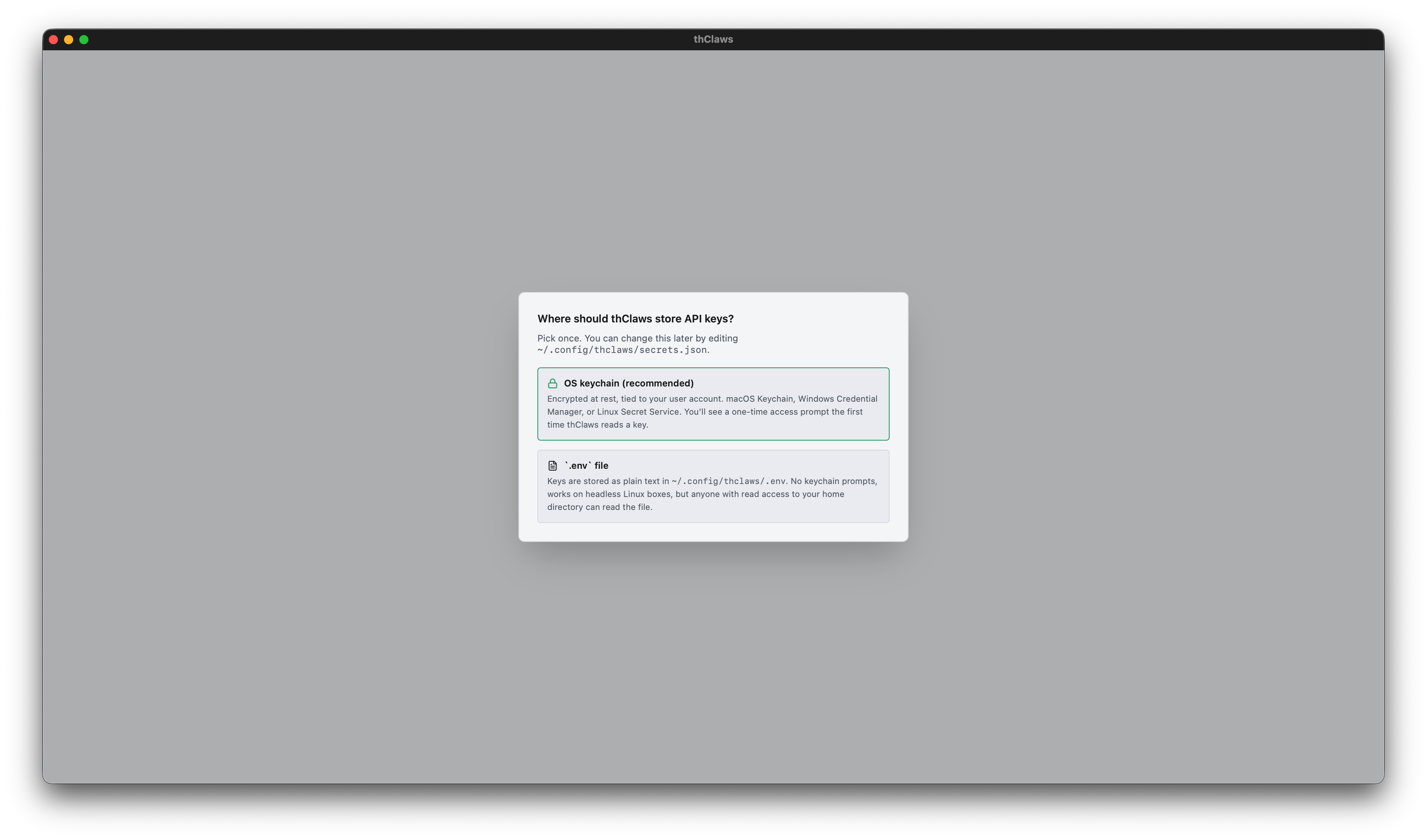
Two choices:
- OS keychain (recommended) — macOS Keychain / Windows Credential Manager / Linux Secret Service. Encrypted at rest and tied to your user account. The first time thClaws reads a key you’ll get a one-time OS access prompt; click “Always Allow” and it’s silent after.
.envfile — plain-text at~/.config/thclaws/.env. No keychain prompts ever. Works on headless Linux boxes that lack Secret Service. Trade-off: anyone with read access to your home directory can read the file, so treat it like any other secret.
Your choice is saved to ~/.config/thclaws/secrets.json and respected
forever after. You can change your mind later: Settings → Provider API
keys → “Change…” link in the modal header re-opens the chooser.
Single-entry keychain bundle (one prompt per launch)
When you pick the keychain backend, all provider keys live inside one
keychain item — service thclaws, account api-keys, storing a JSON map
{"anthropic": "sk-ant-…", "openai": "sk-…", …}. This matters because macOS
Keychain ACLs are per-item: with N separate items you’d get N prompts at every
launch of a rebuilt binary. With one bundle, you see one prompt, click
“Always Allow”, and subsequent launches of the signed binary are silent.
Migration is automatic — first time thClaws reads the bundle, any legacy per-provider entries get pulled into the bundle and the bundle is written back.
Cross-process key visibility
The desktop GUI and the PTY-child REPL are separate OS processes. When you save a key in Settings, the GUI sets the env var for itself, but the already- running REPL child can’t see the GUI process’s env changes. To keep both in sync, every request reads the keychain live if the env var isn’t present — so a key saved in Settings is immediately usable in the Terminal tab’s REPL.
Auto-switch on key save
The tricky case: you save an Anthropic key, but config.model is still
gpt-4o (OpenAI). Without auto-switch you’d still see the red “no API key”
indicator.
thClaws handles this: right after a successful key save, if the currently
configured model’s provider has no credentials, the active model rewrites to
the newly-usable provider’s default (Anthropic → claude-sonnet-4-6, OpenAI →
gpt-4o, etc.). The sidebar flips to green within a second, and the next
chat turn just works.
Diagnostic env vars
| Env var | Effect |
|---|---|
THCLAWS_DISABLE_KEYCHAIN=1 |
Skip keychain entirely. Use for tests and to diagnose flakiness. |
THCLAWS_KEYCHAIN_TRACE=1 |
Print purple diagnostic lines every time a keychain call is made. Shows process ID and the “already loaded” flag. |
THCLAWS_KEYCHAIN_LOADED=1 |
Set automatically by the GUI after first keychain read so the spawned PTY child skips its own walk. You shouldn’t need to touch this. |
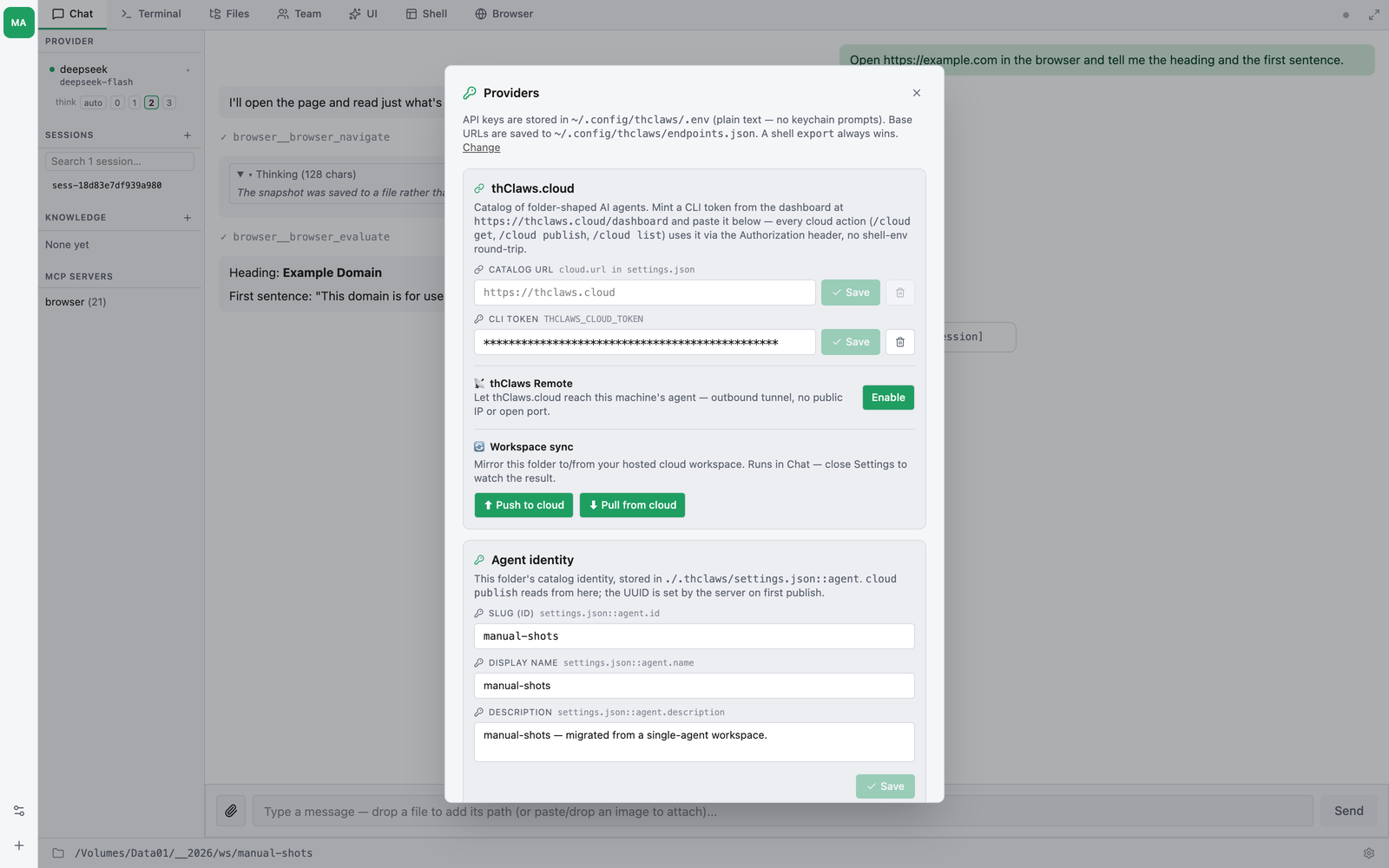
The Settings modal (GUI)
Click the gear icon in the bottom status bar. Each provider card shows:
- API Key field — pre-filled with
*****(asterisks sized to the stored key’s length, capped at 64). Typing anything replaces the sentinel; the field flips from plain text to masked. Save is disabled until you type a real new value. - Base URL field (Ollama only) — pre-filled with the current
configured value or the default placeholder. Stored in
~/.config/thclaws/endpoints.json.
DashScope is locked to its default in the Settings UI but can be
pointed at a regional endpoint with the DASHSCOPE_BASE_URL env var
if you need it (e.g. the Alibaba Cloud International URL).
Clear a key with the trash icon; the keychain entry is deleted and the env var unset for the running session.
.env files (CI, headless, quick-start)
When the keychain isn’t an option — CI runners, headless Linux boxes
without Secret Service, or when you want a key that CLI-only tools
(scripts, thclaws -p in pipelines) can read — the classic .env
path still works:
# ~/.config/thclaws/.env
ANTHROPIC_API_KEY=sk-ant-...
OPENAI_API_KEY=sk-...
OPENROUTER_API_KEY=sk-or-v1-...
GEMINI_API_KEY=AI...
DASHSCOPE_API_KEY=sk-...
OLLAMA_BASE_URL=http://localhost:11434   # defaults to this anyway
OPENAI_COMPAT_BASE_URL=http://localhost:8000/v1   # any OAI-compat gateway
OPENAI_COMPAT_API_KEY=...
⚠️ If you use git, add
.envto.gitignoreimmediately — before you paste any key into it. An.envcommitted to a public (or even private shared) repo is the single most common way API keys leak. The project-scope./.envis especially risky because it lives in your repo root; the user-scope~/.config/thclaws/.envis outside any repo so it’s safe there, but still treat it as a secret file.A one-line fix:
bash
$ echo ".env" >> .gitignore && git add .gitignore
And if you think you already committed one — rotate the key right away at the provider’s dashboard. Git history preserves deleted files forever; rewriting history is messy and anyone who cloned before you noticed already has the key.
Using Ollama locally
- Install Ollama:
brew install ollama(macOS) or see ollama.com. - Pull a model:
ollama pull llama3.2. - Tell thClaws:
/model ollama/llama3.2.
No API key. For a remote Ollama server, set OLLAMA_BASE_URL
(Settings modal or env var).
Using OpenRouter (300+ models via one key)
OpenRouter is a unified gateway to every major LLM vendor (Anthropic, OpenAI, Google, Meta, Mistral, xAI, DeepSeek, Alibaba, and more). One API key, 300+ models.
- Get a key from openrouter.ai/keys.
- Paste it into Settings → API Keys (OpenRouter) — or set
OPENROUTER_API_KEY. - Pick a model:
/model openrouter/anthropic/claude-sonnet-4-6(or any of the hundreds listed by/models).
Model IDs follow the openrouter/<vendor>/<model> shape — copy them
from openrouter.ai/models or paste the
exact string you see in /models output.
Good for:
- Comparing responses across vendors without signing up everywhere
- Testing a new model without a separate account
- Single billing relationship for hobby / small-team use
Note: OpenRouter adds a small markup on top of each vendor’s cost. For high-volume production use, go direct to the source provider.
“Free only” toggle (v0.9.4+)
OpenRouter ships a number of zero-cost models (google/gemma-*:free,
meta-llama/llama-3.3-70b-instruct:free, qwen/qwen3-coder:free,
etc. — typically rate-limited by the upstream provider but $0 / $0
priced). Settings → API Keys → OpenRouter has a Free only
checkbox that filters both the picker AND the /models slash command
to rows the catalogue flagged with free: true:
❯ /models
models — openrouter (29 entries, from catalogue, free only)
  openrouter/google/gemma-4-31b-it:free               262K
  openrouter/meta-llama/llama-3.3-70b-instruct:free    65K
  openrouter/qwen/qwen3-coder:free                    262K
  …
The flag persists in .thclaws/settings.json as
openrouterFreeOnly: true. Toggle off any time to see the full
catalogue again. Other providers ignore this flag — only OpenRouter
publishes per-model pricing the catalogue can read.
When /models returns fewer rows than you expect, two filters are
always on regardless of the toggle: (1) rows flagged chat: false
(audio / image / video / embedding generation — Lyria, Imagen,
gpt-audio, etc.) never appear in the picker because the agent feeds
the response straight into a chat bubble; (2) the catalogue refresh
older than 24 h may be missing entries — run /models refresh to
re-seed.
Canonical model IDs in /models output
/models prints fully-qualified, copy-paste-able ids. OpenRouter
rows show the openrouter/<vendor>/<model> prefix even though the
on-disk catalogue stores them bare, because
ProviderKind::detect("google/gemma-…") returns None without the
prefix and /model <id> would error “unknown model provider”.
Anything you copy from /models straight into /model <id> will
route correctly.
Fusion Router — multi-model deliberation (v0.61.0+)
OpenRouter’s Fusion router is one model id that, behind the scenes, fans your question out to a panel of up to 8 models in parallel (each can search / fetch the web), then a judge model compares all the answers — where they agree (consensus), where they conflict, what’s missing, unique angles, blind spots — and synthesizes the final reply. In short: “many heads + a referee,” packaged as a single model.
Two ways to use it in thClaws:
openrouter/fusion— the default panel (Claude Opus + GPT + Gemini), zero configuration. Just/model openrouter/fusion.openrouter/fusion+— the configurable variant. Selecting it in the model picker opens a config panel where you tune the deliberation:
| Field | Meaning |
|---|---|
| Analysis models | The panel — 1–8 OpenRouter model ids (e.g. anthropic/claude-opus-4.8). Leave empty to use Fusion’s default panel. |
| Judge model | Synthesizes the final answer. Blank = same as the outer model. |
| Outer model | The orchestrator call thClaws makes (a thClaws id, e.g. openrouter/openai/gpt-4.1); also the default judge. |
| Max tool calls | Web-search/fetch steps each panel/judge model may take (1–16, default 8). |
| Max output tokens | Per inner panel/judge call. |
| Temperature | Forwarded to panel + judge (0–2). |
| Reasoning effort | Forwarded to panel + judge. |
| Tool choice | auto (Fusion fires when useful and coexists with the agent’s own tools) or required (always deliberate). |
Your choices persist to .thclaws/settings.json under
openrouterFusion, so they also apply when you run thClaws headless or
with --serve — not just in the GUI.
Fusion is billed by the panel + judge it runs, so a single turn costs more than a single-model call. It’s the practical stand-in when a model you’d otherwise reach for isn’t available on the platform.
Using a generic OpenAI-compatible endpoint (oai/*)
The OpenAICompat provider is a single configurable slot for any
service that speaks OpenAI’s /v1/chat/completions wire format with
a Bearer token. Common targets:
- LLM gateways: LiteLLM, Portkey, Helicone, internal corporate proxies that consolidate vendor billing and apply org-wide policy.
- Self-hosted inference: vLLM, text-generation-inference, lm-deploy,
llama.cpp’s
serverbinary in OpenAI-compat mode, MLX-LM, etc. - Aggregator services other than OpenRouter that follow the same shape but live on a private URL.
Two env vars (or the matching Settings modal card):
OPENAI_COMPAT_BASE_URL=http://localhost:8000/v1
OPENAI_COMPAT_API_KEY=...
Then pick a model:
/model oai/<upstream-model-id>
The oai/ prefix is stripped before the request reaches the
upstream — pass any model id the gateway accepts. Examples:
/model oai/gpt-4o-mini→ wire payloadmodel: "gpt-4o-mini"/model oai/meta-llama/Llama-3.1-70B-Instruct→ wire payloadmodel: "meta-llama/Llama-3.1-70B-Instruct"/model oai/anthropic/claude-sonnet-4-6→ wire payloadmodel: "anthropic/claude-sonnet-4-6"
This is intentionally separate from ProviderKind::OpenAI so real
OpenAI usage (OPENAI_API_KEY + gpt-* / o* models) is
unaffected. Both can coexist — set both env vars and switch with
/model gpt-4o (real OpenAI) vs /model oai/<id> (your gateway).
The Base URL accepts either form:
- Ending in
/v1—/chat/completionsis appended automatically. - Ending in
/v1/chat/completions— used as-is.
Authentication is a standard Authorization: Bearer
$OPENAI_COMPAT_API_KEY header. Gateways with non-Bearer auth (custom
header names, mTLS, etc.) are out of scope — file an issue or use
the EE Phase 3 org-policy gateway route.
If your endpoint also implements /v1/models, /models refresh
will populate the catalogue automatically. If it doesn’t, the
refresh fails silently and chat continues to work.
Using a self-hosted LiteLLM proxy (litellm/*)
LiteLLM has its own slot rather than sharing oai/, so it can keep a
separate base URL and key from whatever else you point oai/ at:
LITELLM_BASE_URL=http://localhost:4000/v1   # default; edit in Settings too
LITELLM_API_KEY=sk-...                      # only if the proxy sets master_key
Model ids are the model_name aliases from your config.yaml, with
the litellm/ prefix stripped before the request goes upstream:
model_list:
  - model_name: gpt-4o-mini            # → /model litellm/gpt-4o-mini
    litellm_params: { model: openai/gpt-4o-mini }
  - model_name: azure/prod-gpt4        # → /model litellm/azure/prod-gpt4
    litellm_params: { model: azure/my-deployment }
Because those aliases are yours, no shipped catalogue can list them —
/models asks the proxy’s /models live instead, and switching onto a
model reads the real context window from LiteLLM’s /model/info (tried
at the root as well as under /v1) and caches it.
Auth is optional: a proxy started without master_key accepts any
bearer, so thClaws sends a placeholder rather than refusing to start.
One caveat — LiteLLM is a router, not local inference. Even though
you host it, the model it resolves to usually lives at OpenAI /
Anthropic / Azure, so thClaws treats its traffic as leaving the machine:
Thai PII masking still applies (unlike ollama/*, vllm/* or
llamacpp/*), and an org-policy gateway does not grant it the
local-model bypass.
Using ChatGPT-subscription Codex (chatgpt-codex/*)
Runs Codex models against chatgpt.com/backend-api/codex/responses,
billed against a ChatGPT Plus / Pro / Team subscription instead
of a paid OpenAI API key. Same wire path the official Codex CLI
uses.
Setup is one-time, and thClaws piggy-backs on the official Codex CLI’s auth:
- Install the Codex CLI (
npm i -g @openai/codex-clior follow their docs). - Run
codex loginonce — opens a browser, you sign in to your ChatGPT account, the CLI persists tokens at~/.codex/auth.json. - In thClaws:
/model chatgpt-codex/gpt-5.4(or any other Codex model under your subscription’s tier).
thClaws auto-imports the auth file on first use — no separate
thClaws-side login. When the access token expires, re-run codex
login; thClaws picks up the refreshed file on the next call.
Caveats:
- The endpoint is undocumented. OpenAI can change the wire shape without notice. If you hit a 400 with an unexpected field name, check the thclaws issues before debugging.
- Subscription rate limits apply (typically much more generous than free API tiers but still finite — heavy automation may hit them).
- Token refresh is not yet automated inside thClaws (re-run
codex
  login
when you see auth errors).
Added in v0.9.5 via PR #88. Credits: ported from themion’s
client_codex.rs.
Sign in to thClaws Cloud — optional
The top-right of the navbar has a Sign in button. As of v0.9.6 the dropdown offers two IdPs:
- Sign in with Google — for personal Google / Workspace accounts.
- Sign in with Microsoft — for Microsoft 365 / Azure Entra
accounts (multi-tenant — any Entra org works without per-tenant
registration). Personal Microsoft accounts (Outlook, Hotmail) also
work via the same
/commonendpoint.
Either path authenticates you against gateway.thclaws.ai and
unlocks cloud-gateway features (per-provider proxying, shared
credit pool — see the thClaws Gateway section below).
Important: thClaws is fully usable without signing in. The button is opt-in; nothing breaks if you ignore it.
From source — point at your own OAuth project
Drop the matching *_CLIENT_ID / *_CLIENT_SECRET pair into .env
(or the workspace’s environment) before launching:
# Google (web/native app — needs both ID and secret)
GOOGLE_CLIENT_ID=...apps.googleusercontent.com
GOOGLE_CLIENT_SECRET=GOCSPX-...

# Microsoft Entra (public/native client — PKCE-only, no secret)
AZURE_CLIENT_ID=00000000-0000-0000-0000-000000000000
Azure is a public client and runs PKCE without a secret. The
Entra app registration needs “Allow public client flows = Yes” and
http://localhost as a redirect URI (no port — Entra matches any
ephemeral port). The full operator walkthrough lives in
docs/azure-setting.md.
Click the button → browser opens → consent screen → desktop catches
the callback → the button switches to your email + a checkmark.
Tokens land in your OS keychain (macOS Keychain / Windows Credential
Manager / Linux Secret Service), not in .env — even when
you’ve chosen the dotenv backend for API-key storage.
From the official dmg / msi
Bundled OAuth credentials are baked into the official builds via CI
secret injection (BUNDLED_GOOGLE_CLIENT_ID,
BUNDLED_GOOGLE_CLIENT_SECRET, BUNDLED_AZURE_CLIENT_ID are read
at compile time). The Sign-in button works out of the box — no
.env setup needed.
No keychain prompt on first launch
Reading the OS keychain triggers an access-prompt the first time a
freshly-signed binary touches an entry, even when the entry doesn’t
exist. v0.9.6 added a small marker file at
~/.config/thclaws/sso-known.json that lists issuers you’ve actually
signed into; startup consults the marker before probing the keychain,
so users who never sign in (and dotenv-backend users for whom SSO is
irrelevant) see zero prompts. The marker contains no secrets — just
a denormalised “yes, there’s a session for X” hint.
Enterprise override
Enterprises that ship a signed policy file with policies.sso
override the standard Google/Microsoft buttons — the navbar shows
their IdP instead. See the technical manual’s SSO doc for the
gateway-side verification model.