
Chapter 9 — Knowledge bases (KMS)
A knowledge base (KMS — Knowledge Management System) is a folder of markdown pages you curate, plus an index.md table of contents the agent reads on every turn. Inspired by Andrej Karpathy’s LLM wiki pattern, thClaws ships with KMS built in — no embeddings, no vector store, just grep + read.
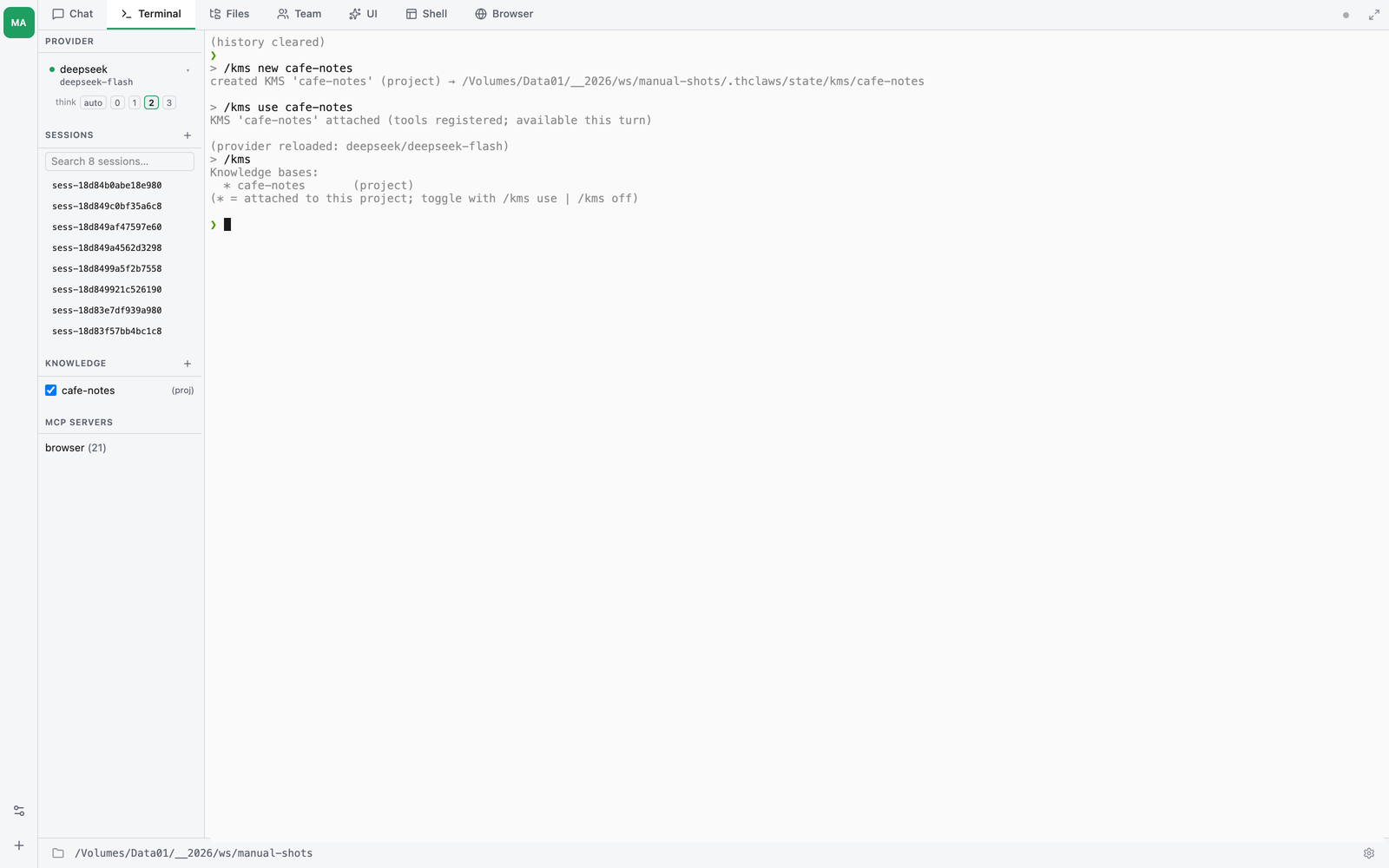
Use cases:
- Personal notes — everything you’ve learned about an API, a library, a client’s codebase
- Project reference — architectural decisions, design principles, common patterns for a specific repo
- Team playbook — standard operating procedures, onboarding checklists
- Language-specific — Thai-aware content (the default works out of the box for Thai thanks to the Grep-based retrieval)
How it’s different from memory or AGENTS.md
| Scope | Size | Retrieval | |
|---|---|---|---|
| AGENTS.md | Full text injected every turn | Small (<few KB) | No retrieval — always in prompt |
| Memory | Individual facts by type | Small (index + body refs) | Frontmatter indexed, body pulled on need |
| KMS | Entire wiki, lazy-loaded | Unbounded (thousands of pages fine) | Grep search + targeted page reads |
Rule of thumb: memory is for things about you and how you work. AGENTS.md is for project conventions. KMS is for content the agent looks things up in.
Scopes
Two scopes, identical internal structure:
- User —
~/.config/thclaws/kms/<name>/— available in every project - Project —
.thclaws/state/kms/<name>/— lives with the repo, follows it into git if tracked
When the same name exists in both scopes, the project version wins.
Layout of a KMS directory
<kms_root>/
├── index.md       ← table of contents, one line per page. The agent reads this every turn.
├── log.md         ← append-only change log (humans + agent write here)
├── SCHEMA.md      ← optional: prose shape rules for pages (KmsWrite reads this)
├── manifest.json  ← schema version + optional frontmatter requirements (see "Schema versioning")
├── pages/         ← individual wiki pages, one per topic
│   ├── auth-flow.md
│   ├── api-conventions.md
│   └── troubleshooting.md
└── sources/       ← raw source material (URLs, PDFs, notes) — optional
/kms new seeds all of the above with minimal starter content so you can start writing immediately.
Canonical page shape
Every page goes through KmsWrite, which expects this YAML frontmatter and stamps a uniform header above the body:
---
title: Human-readable title           # falls back to the filename when missing
topic: One-line description           # what the index shows for this page; write one
sources: ["https://…", "memory"]      # REQUIRED — provenance (URLs, session-XYZ, memory, or [] for opinion)
category: optional grouping
tags: [optional, free-form]
---

(body content — KmsWrite injects the # title / Description / --- block above when you don't write your own)
On disk the final shape becomes:
---
title: …
topic: …
sources: […]
created: 2026-05-11
updated: 2026-05-11
verified: 2026-05-11                  # stamped by /research; manual KmsWrite leaves it absent
---

# {title}

(body)
Provenance discipline — sources: is the answer to the “LLM-Wiki bakes in organised persistent mistakes” critique. KmsWrite warns when the frontmatter is present but missing sources:, and KmsRead later prepends a [note: this page has no verification record] banner. Use explicit sources: [] for opinion / convention pages with no external source — it’s a deliberate acknowledgement, not an omission.
Freshness — pages with verified: older than 90 days get a [note: this page was last verified N days ago — sources may have drifted; re-verify before citing as current fact] banner on every KmsRead. The /research pipeline stamps verified: today on every page it writes; manual KmsWrite callers can stamp it too when they’ve actually re-checked a source.
Existing pages stay — pre-existing pages without the canonical header are not migrated automatically. Re-write through KmsWrite (e.g. via /dream consolidation, /kms reconcile, or a manual rewrite request) to bring them into the new shape.
Adding content: capture and ingest
Three ways to put content into a KMS, in order of how much structure you give the agent up front. Pick whichever matches your situation.
Natural language
Just talk. The agent writes markdown like it writes any other file:
❯ I just read https://example.com/oauth-guide. Ingest the key points into 'notes'.

[assistant] Reading the page…
[tool: WebFetch(url: "https://example.com/oauth-guide")]
[tool: Write(path: "~/.config/thclaws/kms/notes/pages/oauth-client-credentials.md", ...)]
[tool: Edit(path: "~/.config/thclaws/kms/notes/index.md", ...)]
[tool: Edit(path: "~/.config/thclaws/kms/notes/log.md", ...)]
Wrote pages/oauth-client-credentials.md, added entry to index.md, appended to log.md.
This works for anything — articles, screenshots, transcripts, tasks. The agent figures out where things go and writes the page, the index entry, and the log entry.
Slash commands for common shapes
When the source has a fixed shape, a slash command saves you the prompt-engineering. Each is documented in its own section below — quick map here:
/kms ingest NAME <file-or-url-or-$>— pull a file, URL, PDF, or the current chat session into the KMS as a stub page/kms dump NAME <text>— paste freeform content; the agent classifies the dump into chunks and routes each to the right destination/kms file-answer NAME <title>— file the latest assistant message as a new KMS page
Karpathy’s three operations
The conceptual model behind all of this:
- Ingest — read a source, extract distinct facts, write a page, update the index, append to the log
- Query — answer a question from the wiki (the agent does this naturally when the KMS is attached)
- Lint — periodically read all pages and flag merges, splits, or orphans to fix
You can run all three via natural language. The slash commands are shortcuts.
Self-improving AI Agent (auto-learn)
If you want the agent to learn from itself automatically — file
every conversation into a KMS without ever running /kms ingest or
/kms reconcile by hand — flip a single flag in
.thclaws/settings.json:
{
  "autoLearn": true
}
With this on:
- At the end of every session (clicking “new session” or closing
the GUI), thClaws summarises the conversation into a new page in a
KMS called
self_learn(auto-created on first run; project scope). - On a schedule (default every 6 hours), after ingest, it runs
/kms reconcile self_learn --applyto resolve contradictions across pages in that KMS.
That’s the whole thing — it’s just the primitives from this chapter
(/kms ingest $, /kms reconcile) wired into the session lifecycle.
No new agents, no new prompts.
Why self_learn is a dedicated KMS
Auto-learn never touches your hand-curated KMSes (notes,
client-api, anything in kms.active). It writes only to
self_learn. Three reasons:
- Noise control. Not every session has an insight worth keeping. Quarantining auto-ingest in its own KMS keeps your real vaults clean.
- Easy reset. Don’t like what the agent learned?
rm -rf
  .thclaws/state/kms/self_learn/
and start over. Your other vaults unaffected. - Reviewable separately.
git diff .thclaws/state/kms/self_learn/shows only what the agent learned from itself;git diff .thclaws/state/kms/notes/shows only what you curated by hand.
Settings
| key | default | meaning |
|---|---|---|
autoLearn |
false |
Master switch (opt-in) |
autoLearnKms |
"self_learn" |
Override the destination KMS name. Existing KMS by that name is reused; doesn’t have to be empty. |
autoLearnReconcileHours |
6 |
Minimum hours between reconcile passes (set 0 to reconcile every session) |
Quality gate
Sessions shorter than 5 messages are skipped — opening and
closing the app doesn’t trigger ingest. Every decision lands in a
log at ~/.config/thclaws/auto-learn.log:
2026-05-20T08:15:00Z ingest ok: session=sess-abc123 kms=self_learn page=auth-jwt-design
2026-05-20T08:15:42Z reconcile ok: kms=self_learn (next due in 6h)
2026-05-20T09:02:11Z skip ingest: session sess-def456 only had 3 messages (threshold 5)
Where auto-learn runs
As of v0.13.0, the auto-trigger fires from the Desktop GUI and
the Webapp (--serve + browser) — both run the same worker that
manages session lifecycle. CLI REPL and print mode (-p) don’t yet
auto-trigger; wire it via the session_end shell hook
(Chapter 13) until they do.
Multi-KMS: attach any subset to a chat
A project’s active KMS list lives in .thclaws/settings.json:
{
  "kms": {
    "active": ["notes", "client-api", "team-playbook"]
  }
}
Every active KMS’s index.md is concatenated into the system prompt under a ## KMS: <name> heading, each with a pointer to the KmsRead / KmsSearch tools. The agent sees:
# Active knowledge bases

The following KMS are attached to this conversation. Their indices are below —
consult them before answering when the user's question overlaps.

## KMS: notes (user)

# notes
- auth-flow → pages/auth-flow.md — JWT refresh pattern we use
- api-conventions → pages/api-conventions.md — REST style guide

To read a specific page, call `KmsRead(kms: "notes", page: "<page>")`.
To grep all pages, call `KmsSearch(kms: "notes", pattern: "...")`.
And KmsRead / KmsSearch (and the mutating KmsWrite / KmsAppend / KmsDelete) are registered in the tool list. Several slash commands below require at least one KMS to be active — without it, KMS tools aren’t in the registry and the agent can’t act on any KMS by name.
Automatic retrieval (you don’t have to say “from the KMS”)
The index above tells the agent what exists, but relying on the model to decide to look it up is unreliable — for a casual or “tell me about X” phrasing, models (even strong ones) often answer from training data and skip the KMS. So thClaws also does deterministic pre-retrieval: on every message, the engine itself searches your active KMS for the message’s keywords and, when there’s a strong match, injects a short pointer list of the matching topic pages right into that turn — e.g.:
## Relevant KMS pages (auto-matched to this message)
- `KMS: notes/auth-flow` — JWT refresh pattern we use
The agent then reads those pages and answers from them (citing KMS: <name>/<page>), instead of re-deriving the answer or doing a fresh web search. It’s gated by relevance, so greetings, coding turns, and off-topic asks pull nothing; provenance/audit pages (session digests, dream logs) are skipped in favour of canonical topic pages. The net effect: ask “tell me about Corgis” and you get your curated page back — no need to add “from the KMS”. (Requires the BM25 search index, which the released binaries include; cargo install users opt in with --features kms_search_index.)
Slash commands
The full surface, grouped by purpose:
- Discovery and inspection:
/kms,/kms show - Lifecycle:
/kms new,/kms use,/kms off - Capture:
/kms ingest,/kms dump,/kms file-answer - Maintenance:
/kms lint,/kms wrap-up,/kms reconcile,/kms maintain(all four in one pass),/kms migrate - Cross-linking:
/kms link - Consolidation:
/kms merge - Decision support:
/kms challenge - Interchange:
/kms export-okf,/kms import-okf - Destruction:
/kms drop
Most subcommands accept short aliases (e.g. add for ingest, rm for drop) — the aliases are listed inline under each section heading below.
/kms (or /kms list)
List every discoverable KMS; * marks ones attached to the current project.
❯ /kms
* notes              (user)
  client-api         (project)
* team-playbook      (user)
  archived-docs      (user)
(* = attached to this project; toggle with /kms use | /kms off)
/kms show NAME
Print the KMS’s index.md to inspect what’s there. Aliases: cat.
❯ /kms show notes
# notes
- auth-flow → pages/auth-flow.md — JWT refresh pattern we use
- api-conventions → pages/api-conventions.md — REST style guide
...
/kms new [--project] NAME
Create a new KMS and seed starter files (including manifest.json). Aliases: create.
❯ /kms new meeting-notes
created KMS 'meeting-notes' (user) → /Users/you/.config/thclaws/kms/meeting-notes

❯ /kms new --project design-decisions
created KMS 'design-decisions' (project) → ./.thclaws/state/kms/design-decisions
- Default scope is user (available in every project)
--projectputs it in.thclaws/state/kms/(lives with the repo)
/kms use NAME
Attach a KMS to the current project. The KmsRead / KmsSearch / KmsWrite / KmsAppend / KmsDelete tools are registered into the current session immediately and the index.md is spliced into the system prompt — no restart, works in the CLI REPL and either GUI tab. Aliases: on.
❯ /kms use notes
KMS 'notes' attached (tools registered; available this turn)
/kms off NAME
Detach a KMS. Also live — when the last KMS detaches, the KMS tools are dropped from the registry so the model stops seeing them as options. Aliases: unuse.
❯ /kms off archived-docs
KMS 'archived-docs' detached (system prompt updated)
/kms ingest NAME <file-or-url-or-$>
Add a source. Auto-detects the source type and routes to the right ingest path. Aliases: add. Two-step split: raw bytes go to sources/<alias>.<ext> (immutable), a stub page lands in pages/<alias>.md with frontmatter pointing back at the source. You then enrich the stub via natural prompting or another /kms ingest --force.
| Source pattern | Behaviour |
|---|---|
<file.md> / .txt / .json / .rst / .log / .markdown |
Plain text — copy bytes, write stub |
<file.pdf> |
Runs pdftotext first (requires poppler-utils installed locally), then ingest |
https://... URL |
HTTP fetch (30s timeout); response body gets a <!-- fetched from <url> on <date> --> banner, then ingest |
$ |
Special — “the current chat session.” Triggers an agent turn that summarizes the conversation as a wiki page (200–1500 words, synthesized) and calls KmsWrite. Page name resolves from session.title (sanitized) or session.id (sess-<hex>) — see below. |
Optional flags:
as <alias>— override the auto-derived page stem. Useful when the filename or URL produces something ugly.--force— replace the existing page with the same alias, AND mark all pages whose frontmattersources:references this alias with a> ⚠ STALEmarker (the re-ingest cascade). Pages flagged STALE need refresh against the new source content;/kms wrap-upsurfaces them.
Atomic notes from a document. In the GUI’s Files tab, Add to KMS as
atomic notes runs the /research writer over the archived source
instead of a one-page summary: the document is digested in windows,
claims are quote-checked, and the result is a topic page (over the
stub) plus one note per idea, all citing ../sources/<alias>.md. See
chapter 4 and chapter 20.
❯ /kms ingest notes ~/Downloads/oauth-spec.pdf
ingested oauth-spec → pages/oauth-spec.md (12 KB extracted)

❯ /kms ingest notes https://example.com/articles/best-practices.html as best-practices
ingested best-practices → pages/best-practices.md (4.2 KB)

❯ /kms ingest notes ~/Downloads/updated-spec.pdf as oauth-spec --force
re-ingested oauth-spec; marked 3 dependent page(s) stale
For multi-paragraph paste with no specific source file, /kms dump is a better fit.
/kms ingest NAME $ — file the current chat session
Special source target $ triggers an agent turn that summarizes the live conversation. The slash rewrites itself into a structured prompt instructing the agent to:
- Summarize the conversation as a self-contained wiki page (200–1500 words, synthesized — not transcribed)
- Call
KmsWrite(kms: "<name>", page: "<page>", content: "...")with frontmattercategory: session, sources: chat - Confirm with the resolved path
Page name resolves with this precedence:
- User-supplied via
as <alias>(sanitized to a kebab-case stem) - Session title if your session has one
- Session id (
sess-<hex>) as final fallback
Use --force to replace if the resolved page already exists.
/kms dump NAME <text>
Capture freeform content and route it. The agent classifies the dump into chunks (one decision, one observation, one new source per chunk), announces its routing plan in plain text, then executes via KmsWrite / KmsAppend. Aliases: capture.
Requires KMS tools — run
/kms use <name>first if no KMS is attached. Without it the command refuses with a clear error.
❯ /kms dump notes Big standup. Decision: defer Redis migration — Tom raised cost
  concerns, Sarah agreed. Win: auth refactor praised by manager. Risk:
  backend cap shrinks next sprint, may push deadline.

(/kms dump notes → routing 198 char(s))

[agent] I'll route this:
- Append to redis-migration.md — decision to defer with Tom's cost rationale
- Append to brag-doc.md — manager praise on auth refactor
- Append to team-capacity.md — backend cap risk for next sprint
- Skip "big standup" header — too generic to file

[KmsAppend ×3 fire]

**Created**: none
**Appended**: redis-migration.md, brag-doc.md, team-capacity.md
**Skipped**: "big standup" — too generic
Multi-line paste works in either CLI or GUI. The announce-then-execute pattern is built into the prompt: the agent prints its plan before any tool calls so you can ⌃C to abort. Hard rules on the agent: no inventing sources, no KmsDelete, every new page must reference at least one existing page (otherwise the chunk gets deferred).
capture is an alias for dump if it reads more naturally to you.
/kms file-answer NAME <title>
File the latest assistant message in your chat as a new KMS page. Useful when the agent has just produced something worth keeping (a synthesis, a comparison table, a debugging recap) and you want it in the wiki rather than scrolling chat history later. Aliases: file.
❯ /kms file-answer notes oauth-debugging-recap
filed answer → /Users/you/.config/thclaws/kms/notes/pages/oauth-debugging-recap.md (1428 bytes)
Page name is <title> sanitized to a stem. Frontmatter pre-set to category: answer, filed_from: chat. Body is the latest assistant message verbatim under an H1 with the title.
/kms verify [NAME] [--llm] [--fix] [--stale-days N] [--page SLUG]
Where lint asks whether the structure holds, verify asks whether
the evidence does. Name is optional — the attached KMS is used.
The default pass reads files only and costs nothing:
| Check | What it catches |
|---|---|
| unresolved citation | a [N] that names no source in the KMS’s registry |
| missing archive | a cited source with no copy under sources/ |
| quote drift | a claim whose verbatim quote is no longer in the archived source — the archive was edited or replaced since the claim was extracted |
| links inside a URL | a linker that rewrote a word inside an address, leaving https://[[tracxn]].com/…. --fix unwraps them, and only them |
sources: drift |
frontmatter and body disagreeing about which sources the note stands on |
| uncited assertion | a paragraph asserting a number with no citation anywhere in it |
| stale | a note whose updated: is older than --stale-days (default 90) |
--llm adds the one check a file cannot make: does each sentence follow
from the claims it cites? It sends the note and the claim texts
behind its citations — not the source bodies, which the claims were
already checked against — so a page costs about 15 KB of prompt and the
pages run eight at a time. The v1 research verifier asked the same
question by re-sending every source body, one page at a time, and took
longer than the search that produced the pages.
The auditor is held to the same standard as the extractor: a flagged sentence that is not in the note character for character is dropped, so a model that paraphrases its own input cannot invent a finding.
❯ /kms verify research
KMS 'research' verify — 51 page(s), 556 claim(s) re-checked against 56 archived source(s)

20 finding(s)

`sources:` disagreeing with the body (9):
  - deepseek: body cites [10], [11], [12], … but `sources:` does not list them
/kms lint NAME
Pure-read health check. Walks pages/ and reports six categories of issue: broken links to other pages, pages with no inbound links (orphans), index entries pointing at missing files, pages on disk missing from the index, pages without YAML frontmatter, and (when manifest.json declares frontmatter_required) missing required fields per page category. An inbound link is anything the graph view would draw — a [text](pages/x.md) markdown link, a [[wikilink]], or a related: entry — so a note wired up by /research or /kms link is not reported as an orphan.
❯ /kms lint notes
KMS 'notes': 3 issue(s)

broken links (1):
  - oauth-flow → pages/sso-config.md (missing)

pages missing from index (1):
  - tracing-conventions

missing required frontmatter fields (1):
  - paper-x: 'sources' (required by research)
/kms lint aliases: /kms check, /kms doctor.
/kms wrap-up NAME [--fix]
Session-end review. Combines lint with a scan for stale-marker pages — pages flagged by the re-ingest cascade (> ⚠ STALE: source <alias> was re-ingested on YYYY-MM-DD) that are awaiting a refresh against the new source content. Aliases: wrapup, wrap.
❯ /kms wrap-up notes
KMS 'notes': wrap-up — 3 lint issue(s), 1 stale marker(s)

broken links (1):
  - oauth-flow → pages/sso-config.md (missing)

stale pages awaiting refresh (1):
  - summary: source `topic` re-ingested on 2026-05-08 (page not yet refreshed)

next steps: ask the agent to refresh stale pages and fix lint issues, or run `/kms lint <name>` again after edits.
--fix dispatches the built-in kms-linker subagent (see “Maintenance subagents” below) to act on the report — search for the intended target of broken links, append missing index bullets, refresh stale pages from their sources. Hard rules: no inventing, no deletion, leaves orphans alone (often intentional). GUI-only — the CLI prints the report and tells you to invoke from the GUI.
Requires KMS tools — run
/kms use <name>first. The--fixbranch refuses with a clear error if no KMS is attached, since the subagent inherits the parent’s tool registry and would otherwise spawn with no usable tools.
/kms reconcile NAME [<focus>] [--apply]
Auto-resolve contradictions. Dispatches the built-in kms-reconcile subagent which runs four passes (claims / entities / decisions / source-freshness), classifies each finding (clear-winner / ambiguous / evolution), and either rewrites the outdated page with a ## History section or creates a Conflict — <topic>.md page for genuinely-ambiguous cases. Dry-run by default; --apply executes writes. Optional second positional arg narrows the pass to a specific topic. GUI-only. Aliases: resolve.
Requires KMS tools — run
/kms use <name>first if no KMS is attached.
❯ /kms reconcile notes
✓ kms-reconcile dispatched (id: side-7e2a, dry-run)

[subagent reports back]

**Auto-resolved (3):**
- `oauth-flow.md`: "tokens expire 15min" → "tokens expire 30min" (newer source 2026-04 supersedes 2025-09)
- `team-sarah-chen.md`: role updated from "Eng Lead" to "Director" per Q2 standup notes
- `redis-config.md`: cite `redis-2026-spec.md` instead of `redis-2025-spec.md`

**Flagged for user (1) — Conflict pages would be created:**
- `Conflict — auth-token-rotation.md`: paper-x says rotate every 24h, paper-y says
  every 7d. Both peer-reviewed. Needs human judgment.

**Stale pages updated (2):**
- `architecture-overview.md`: now cites `2026-arch-rfc.md` (was `2025-arch-rfc.md`)
- `db-migrations.md`: same

this was a dry-run preview. re-run with `--apply` to execute.
kms-reconcile’s tool whitelist is strictly narrower than dream — KmsRead, KmsSearch, KmsWrite, KmsAppend, TodoWrite only. No KmsDelete (reconcile preserves every original claim, either in ## History on the rewritten page or in the Conflict page). Hard rules: never invent dates or sources; “someone changed their mind” classifies as Evolution, not contradiction.
/kms maintain NAME [--apply]
The one-command maintenance umbrella. Instead of running lint, wrap-up --fix, and reconcile separately, /kms maintain dispatches the built-in kms-maintain subagent to run them as a single staged pipeline — plus a step the others can’t do (reconciling provenance against your live sessions). Dry-run by default; --apply executes. GUI-only. Aliases: tidy.
The five stages, run in order (cheap mechanical cleanup first, judgment-heavy work last):
- Structural fixes — broken page links, pages missing from the index, missing required frontmatter (the
lint+kms-linkerjob). - Source reconciliation — globs your live
.thclaws/state/sessions/, and for any page whosesources:lists asess-…whose session you’ve since deleted, drops just that dead id fromsources:. Pages are never deleted — knowledge built from a session outlives the session; only the dangling pointer goes. (This is the full-vault version of the cleanup/dreamdoes incrementally.) - Stale refresh — refreshes pages flagged
> ⚠ STALEby the re-ingest cascade. - Contradiction reconciliation — the full
reconcilepass (claims / entities / decisions / source-freshness) across the whole vault, with## Historyrewrites andConflict —pages. - Orphans — listed for your review, never modified.
❯ /kms maintain notes
✓ kms-maintain dispatched (id: side-9f3c, dry-run)

[subagent reports back, sections in stage order]
DRY-RUN — no changes written. Re-run with --apply to execute.
**Structural fixed (1):** - oauth-flow: relinked to sso-config
**Sources reconciled (2):** - corgi: dropped dead sess-… (session deleted)
**Contradictions auto-resolved (1):** - redis-config: cites 2026 spec
**Orphans (3, untouched):** - …
Like reconcile, the kms-maintain agent has no KmsDelete — it never deletes a page, the most it removes is a dead reference inside one. It does have Glob (needed to read the live session set in stage 2). Requires KMS tools — run /kms use <name> first.
/kms maintain vs /dream — complementary. /dream is incremental: it mines new sessions and cleans only the pages it touches. /kms maintain is a full-vault sweep over every page, regardless of recent activity — run it occasionally (or before a commit) to tidy the whole KMS at once.
/kms migrate NAME [--apply]
Schema migration. Defaults to dry-run (prints the plan without writing); pass --apply to execute. Idempotent — running on a KMS already at the latest version reports already at schema version X — nothing to migrate. Aliases: upgrade.
❯ /kms migrate legacy-notes
KMS 'legacy-notes': migration plan (0.x → 1.0, 1 step(s))

0.x → 1.0:
  - write /Users/you/.config/thclaws/kms/legacy-notes/manifest.json (schema_version: 1.0, frontmatter_required: empty)

this was a dry-run preview. re-run with `--apply` to execute.

❯ /kms migrate legacy-notes --apply
KMS 'legacy-notes': migration applied (0.x → 1.0, 1 step(s))

0.x → 1.0:
  - write /Users/you/.config/thclaws/kms/legacy-notes/manifest.json (schema_version: 1.0, frontmatter_required: empty)

logged to log.md. /kms lint to verify.
When schema changes ship in a future release, /kms migrate chains through every step from your current version to the latest. The current 0.x → 1.0 step only writes manifest.json; no page bodies are touched.
/kms challenge NAME <idea>
Pre-decision red-team. Given an idea or plan, the agent searches the KMS for past failures, reversed decisions, and contradictions on the topic, then produces a structured Red Team analysis citing specific pages. Read-only — no writes. Aliases: redteam.
Requires KMS tools — run
/kms use <name>first if no KMS is attached.
❯ /kms challenge notes I should ship the auth refactor this week without
  the new test harness in place.

[agent searches across the KMS]

**Your position:** Ship auth refactor this week without the new test harness.

**Counter-evidence from your vault:**
- `incident-2026-01-12` (date: 2026-01-12): "Auth incident traced to insufficient
  integration test coverage. Decision: never ship auth changes without the test harness."
- `1-1-Sarah-2026-04-08` (date: 2026-04-08): Sarah explicitly flagged "ship-without-tests
  is a recurring pattern that bites you every quarter."

**Blind spots:** You may be discounting the integration test gap because the unit
tests pass. Past auth incidents in your vault show the failure mode is at the
integration boundary.

**Verdict:** The vault suggests caution. Past incidents and a recent 1:1 both
point to the same risk. Recommend at minimum a manual smoke pass before merge.
The agent’s prompt explicitly tells it “don’t be agreeable” — push back when the vault gives ammunition. The output is a written analysis, not vault writes; nothing is filed.
/kms link [<name>] [--apply] [--llm] [--min-len N]
Auto-insert [[wiki-style]] cross-links across pages in a KMS. Without a name, it iterates every KMS in kms_active for this session. Aliases: autolink, cross-link.
Deterministic by default — scans each page’s ## Goal / ## Links headings and the body for occurrences of other page stems (case-insensitive, word-boundary aware) and rewrites them as [[page-stem]]. --min-len N (default 4) suppresses links shorter than N characters so noise like [[api]] doesn’t carpet every page.
--llm switches to a per-page LLM pass — sends each page through the current model with the KMS index as context and asks it to surface non-obvious cross-link opportunities. Slower (one provider call per page) but catches semantic matches the deterministic pass misses (“session” ↔ “conversation”, “token” ↔ “API key”, etc.).
Dry-run is the default. Pass --apply to actually write the changes.
❯ /kms link notes
/kms link notes (deterministic, dry-run): scanned 23 page(s), 8 would gain link(s), 19 link insertion(s) total.
    oauth-flow: "session" → [[session-management]]
    oauth-flow: "refresh token" → [[token-refresh]]
    incident-2026-01-12: "auth flow" → [[oauth-flow]]
    …
  re-run with --apply to write the changes.

❯ /kms link notes --apply
/kms link notes (deterministic, applied): scanned 23 page(s), 8 modified, 19 link insertion(s) total.
Use it after /kms ingest runs to weave new pages into the existing graph, or after /kms merge once the combined set settles.
/kms merge <src> <dst>
Consolidate two KMSes — copy every page, source, and index entry from src into dst, with collision handling. Aliases: combine.
- Page name collision → the incoming page is renamed
<stem>-1.md(or-2,-3, …) so the destination’s original wins. - Aggregator pages (those tagged
aggregator: truein frontmatter, e.g.architecture.md) get combined instead of renamed — the src body is appended under the dst body so consolidated overview pages don’t fragment. - Source files in
sources/follow the same rename-on-collision rule. - Index entries in
dst/index.mdget appended for every new page.
src is left intact — merge is non-destructive on the source side so you can verify before cleaning up.
❯ /kms merge old-notes new-notes
merged 'old-notes' → 'new-notes': 47 page(s) copied (3 renamed, 2 combined), 14 source(s) copied (1 renamed), 47 index entr(ies) added.
  aggregator pages combined (src body appended under dst body):
    architecture.md
    decisions.md
  collision renames (kept original on dst, incoming was renamed):
    page: oauth-flow.md → oauth-flow-1.md
    page: session-id.md → session-id-1.md
    page: README.md → README-1.md
    source: spec.pdf → spec-1.pdf
  'old-notes' is left intact; run `/kms drop old-notes` once you've verified.

suggested workflow now:
  /kms wrap-up new-notes --fix       # fix broken links + STALE markers
  /kms link new-notes                # dry-run preview of auto-links
  /kms link new-notes --apply        # write the wikilinks
  /kms reconcile new-notes --apply   # resolve contradictions across pages
  /kms drop old-notes --force        # remove the source KMS once happy
The output suggests the natural cleanup sequence — wrap-up --fix patches broken links from the rename pass, link --apply weaves new pages into the graph, reconcile --apply resolves contradictions where two KMSes covered the same topic differently, then drop --force retires the source KMS.
/kms rename OLD NEW
Renames the KMS folder in place (same scope). If OLD is attached to the
project the attachment follows, and in the GUI the agent is rebuilt so
the system prompt names the new KMS. Pages, sources and wikilinks are
untouched — links point at page slugs, not at the KMS name. Refuses a
name that already exists or contains path separators. Alias: mv.
In the GUI, right-click a KMS in the sidebar’s Knowledge list for
Rename…, Export OKF bundle… and Delete… (Delete asks for
confirmation, then runs /kms drop NAME --force).
/kms drop NAME [--force]
Removes the KMS directory tree (<scope>/.thclaws/state/kms/<name>/ or ~/.config/thclaws/kms/<name>/) — but does not destroy it: what it removes is moved to <scope>/.trash/, kept for 30 days, and brought back by /kms restore NAME. Aliases: delete, rm.
Dry-run is the default. Without --force it prints how many pages and sources would be removed but doesn’t touch disk:
❯ /kms drop archived-notes
/kms drop archived-notes: dry-run (would remove 12 page(s), 3 source(s) from /Users/you/.config/thclaws/kms/archived-notes).
  re-run with --force to delete.

❯ /kms drop archived-notes --force
deleted KMS 'archived-notes' (12 page(s), 3 source(s)) from /Users/you/.config/thclaws/kms/archived-notes.
--force also detaches the KMS from this session’s kms_active list (otherwise the next system-prompt rebuild would fail trying to resolve a dangling name). The GUI sidebar refreshes immediately so the dropped KMS disappears from the Knowledge section.
No undo — the directory is gone after --force. If the KMS is in git (project-scope, committed), recover via git checkout; otherwise it’s gone. Pair with /kms merge first when consolidating to keep a copy in the destination KMS before dropping the source.
Your frontmatter survives a rewrite
/research rewrites a note whenever a later run adds claims to it, and
write_page replaces the file. Two guarantees keep that from eating
your curation:
created:is carried over from the file on disk whenever the writer does not supply one, so a note’s creation date is set once.- A research update keeps every frontmatter key it does not own —
category,tags,aliases,verified, anything you added. It owns onlytitle,type,kind,related,sources,claims,confidenceandupdated. (status: derived/status: researchingare cleared, since the page has now been written.)
Schema versioning and frontmatter rules
manifest.json is the KMS’s machine-readable schema. New KMSes get one automatically:
{
  "schema_version": "1.0",
  "frontmatter_required": {}
}
Two things live here:
schema_version— anchors/kms migrate. When thClaws ships a schema change, the migrator detects your current version from this field and walks the chain up to the latest.frontmatter_required— optional enforcement. Empty by default; edit it to declare which YAML frontmatter fields each page category must have.globalapplies to every page; per-category keys apply only to pages whosecategory:field matches.
{
  "schema_version": "1.0",
  "frontmatter_required": {
    "global": ["category", "tags"],
    "research": ["sources"]
  }
}
/kms lint reports violations:
missing required frontmatter fields (1):
  - paper-x: 'sources' (required by research)
Pages without any frontmatter at all are flagged separately under pages without YAML frontmatter and skipped from per-field checks — one fix at a time.
Legacy KMSes (created before manifests existed) have no manifest.json and silently skip the per-field check. Run /kms migrate <name> --apply to bring them to v1.0; the migration is purely additive (writes the manifest file, doesn’t touch pages).
Importing and exporting OKF bundles
A KMS can be shipped to — and created from — an Open Knowledge Format (OKF) bundle. OKF is Google’s open v0.1 spec for representing knowledge as a folder of markdown files with YAML frontmatter — the same “LLM wiki” shape a KMS already uses. Because the formats are so close, this is a clean round-trip: export a KMS as a vendor-neutral bundle you can zip up, commit to git, or hand to another team’s agent; and import any OKF bundle (yours or someone else’s) as a new KMS.
Nothing about how your KMS works on disk changes — this is a converter, not a new storage format. The agent still reads your KMS exactly as before.
Export — /kms export-okf NAME [OUT-DIR]
Writes the KMS as an OKF bundle. Without an output directory it lands in ./NAME-okf/ in your working directory:
❯ /kms export-okf notes
exported 'notes' as OKF bundle → /Users/you/work/notes-okf (42 page(s), 7 reference(s)).
The bundle is a plain folder you can browse, diff, or archive:
notes-okf/
├── index.md          # table of contents (declares okf_version)
├── log.md            # change history
├── SCHEMA.md         # your page conventions
├── pages/            # one markdown file per page (your "concepts")
└── references/       # your raw sources
During export the frontmatter is normalised to OKF’s vocabulary — your category: becomes OKF’s required type:, topic: becomes description:, comma-separated tags become a YAML list — and [[wikilinks]] become ordinary markdown links so any OKF reader can follow them. Your KMS-specific fields (sources, verified, created) are preserved as-is, so a round-trip loses nothing.
Import — /kms import-okf BUNDLE-DIR NAME [--project]
Creates a new KMS named NAME from a bundle on disk. Defaults to user scope; add --project to create it under ./.thclaws/state/kms/ instead:
❯ /kms import-okf ./partner-bundle partner-knowledge
imported OKF bundle './partner-bundle' → KMS 'partner-knowledge' (user scope): 30 page(s), 4 source(s).
  attach it with `/kms use partner-knowledge`.
Import is forgiving by design (per the OKF spec): unknown field values, missing fields, and broken cross-links are all tolerated rather than rejected. Concepts that live anywhere in the bundle — not just under pages/ — are pulled in, and the table of contents is rebuilt fresh so the result behaves like any other KMS. Import refuses if a KMS by that name already exists at the chosen scope; drop it or pick another name.
From the sidebar (GUI)
You don’t need the commands in the desktop app — right-click the “Knowledge” section header in the sidebar:
- Import OKF bundle… asks for the new KMS name and scope, then opens a native folder picker for the bundle directory.
- Export OKF bundle lists your KMSes; pick one and choose a destination folder.
A short status line under the header confirms the result, and an import makes the new KMS appear immediately with its attach checkbox. (These menu actions are desktop-only because they open a native folder dialog; over --serve/remote use the slash commands.)
Sidebar (GUI)
The sidebar’s Knowledge section lists every discoverable KMS with a checkbox per entry. Tick to attach, untick to detach — the same underlying toggle as /kms use / /kms off.
The + button prompts for a name, then asks for scope (OK = user, Cancel = project). A new KMS is created with starter files ready to edit.
Right-click the “Knowledge” header for OKF import/export (see Importing and exporting OKF bundles above).
Tools the agent calls
KmsRead(kms: "name", page: "slug")
Reads <kms_root>/pages/<slug>.md. The .md extension is added if missing. Path traversal is rejected (.., absolute paths, anything outside pages/).
The agent calls this after spotting a relevant entry in index.md:
[assistant] I'll check the auth-flow page first…
[tool: KmsRead(kms: "notes", page: "auth-flow")]
[result] (page content)
KmsSearch(kms: "name", pattern: "regex") — line grep (default)
Grep-style scan across <kms_root>/pages/*.md. Returns matching lines as page:line:text, one per line. Use for exact-shape lookups (find a specific TODO marker, function name, error code).
[assistant] Let me search for "bearer" across my notes…
[tool: KmsSearch(kms: "notes", pattern: "bearer")]
[result]
auth-flow:12:Bearer tokens expire after 15 minutes
api-conventions:34:Always include "Authorization: Bearer <token>"
KmsSearch(kms: "name", query: "...") — BM25-ranked search
Native-language search across page title (×4 boost), topic (×2), and body. Returns ranked hits with snippet previews. Use when you don’t know the exact phrasing and want the most relevant pages, not every line that matches.
[assistant] Let me find pages about refresh tokens…
[tool: KmsSearch(kms: "notes", query: "token refresh flow")]
[result]
[score 6.12] page: auth-flow
  title: Refresh-token rotation
  topic: auth
  preview: The token refresh rotates on every login. Refresh tokens are stored…

[score 4.88] page: bug-2023-03
  preview: Rotation logic in __refresh_token__ misfired when the session…
Optional filters narrow the candidate set without affecting score ranking:
tags: ["auth", "security"]— match pages tagged with ANY of these (OR semantics; uses frontmattertags:).category: "runbook"— exact match on the page’s frontmattercategory:.limit: 20— max hits (default 10, capped at 50).
Build prerequisite. query: mode requires the kms_search_index Cargo feature, which adds ~4-5 MB to the binary (tantivy + a Thai-aware dictionary). The official release binaries on github.com/thClaws/thClaws/releases ship with it ON; users who cargo install need cargo install thclaws-core --features kms_search_index. Without the feature, query: returns a clear error directing you to pattern:. The regex pattern: path always works.
First-touch indexing. The first query: call against a KMS that doesn’t have an index yet builds one synchronously from pages/ on disk and emits a one-line [index rebuilt — N page(s) indexed] advisory. Subsequent queries hit the warm index (sub-50 ms on a 1000-page KMS). Bulk operations that don’t fire per-page index hooks — /kms merge, /kms link --apply — trigger the same rebuild on the next query, or you can force one with /kms reindex <name>.
Thai-aware tokenization. The BM25 path uses a native Rust port of PyThaiNLP’s newmm segmenter so Thai content indexes word-by-word, not as one paragraph-sized token. Search works equally well on query: "token refresh" and query: "การรีเฟรช token". Per-project supplements via <kms_root>/extra_words_th.txt let you add domain-specific terms the base dict misses.
/kms search <name|*> <query> — one-shot operator search
Same surface as the KmsSearch tool, exposed as a slash command so you can search without a model round-trip (saves tokens + latency for exploratory lookups, and confirms the index works after /kms reindex).
> /kms search notes token refresh
[score 6.12] page: auth-flow
  title: Refresh-token rotation
  preview: The token refresh rotates on every login…
Use * for <name> to fan out across every visible KMS — results are grouped under a per-KMS header so attribution stays clear:
> /kms search * bearer
── KMS: notes ──
[score 5.41] page: auth-flow
  preview: Bearer tokens expire after 15 minutes…

── KMS: project ──
(no hits)
Default mode is BM25 query:. Switch to the regex line-grep with --pattern:
> /kms search notes --pattern ^TODO
todos:3:TODO: rotate the staging cert
api:18:TODO: deprecate /v1
/kms reindex <name> — manual rebuild
Drops <kms_root>/.index/ and rebuilds from pages/ on disk. Operator-only (no KmsReindex tool — the model doesn’t decide to rebuild mid-turn). Useful after bulk operations the index didn’t see, or if the index file ever corrupts.
> /kms reindex notes
/kms reindex notes — rebuilding…
/kms reindex notes — indexed 247 page(s)
KmsWrite, KmsAppend, KmsDelete, KmsCreate
The mutation surface used by the agent (and by the /dream consolidator below). Always-on — registered regardless of whether any KMS is currently attached, so /dream and other side-channel agents can bootstrap an audit-log KMS from a zero state. Each requires approval by default except KmsCreate (idempotent + name-validated, same risk profile as SessionRename).
KmsWrite(kms, page, content)— create-or-replace a page. Preserves YAML frontmatter, bumpsupdated:, refreshes theindex.mdbullet, appends awrote | <page>entry tolog.md. Auto-injects a# {title}heading when the body doesn’t lead with a# heading. Warns whensources:frontmatter is missing.KmsAppend(kms, page, content)— extend a page in place. Faster thanKmsWritefor incremental updates (logs, journal entries, accumulated notes). Bumpsupdated:if the page has frontmatter.KmsDelete(kms, page)— remove a page, prune itsindex.mdbullet, appenddeleted | <page>tolog.md. Used during consolidation to retire duplicates or stale entries.KmsCreate(name, scope)— ensure a KMS exists. Idempotent: returns the existing ref if already present, otherwise seeds the directory tree (pages/,sources/,index.md,log.md,SCHEMA.md,manifest.json). Used by/dream’s Pass 4 to bootstrap the dedicateddreamsaudit KMS before writing the run summary.
Page names are validated path-segments — no separators, no traversal, and the reserved names index, log, SCHEMA cannot be used as a page name (they’re managed by the KMS itself).
Maintenance subagents
Three built-in subagents handle KMS upkeep. They run as side channels (Chapter 15) — concurrent agents in their own context windows, so the heavy walking doesn’t pollute your main conversation.
| Agent | Trigger | Scope | When to use |
|---|---|---|---|
dream |
/dream |
All active KMSes | Periodic deep consolidation — mines recent sessions, dedupes pages, restructures |
kms-linker |
/kms wrap-up <name> --fix |
One KMS, one report | Targeted fixes — acts on a concrete lint + stale-marker report |
kms-reconcile |
/kms reconcile <name> [--apply] |
One KMS | Auto-resolves contradictions across pages — rewrites with ## History, flags ambiguous as Conflict pages |
All three need at least one KMS in
kms_activeso the KMS tools register before the subagent spawns. Run/kms use <name>first; without an active KMS the dispatch refuses with a clear error rather than spawning a tool-less subagent.
You can also run these on a schedule via Chapter 19’s pre-packaged presets — nightly-close, weekly-review, contradiction-sweep, vault-health. Note that scheduled fires use natural-language tool directives (not slash commands) because the daemon fires via thclaws --print which doesn’t run slash dispatch.
Broad consolidation: /dream
After a few weeks of work, your KMS accumulates duplicates: two pages on the same topic that drifted apart, an old entry contradicted by something you said yesterday, insights from sessions that never made it into a page. /dream is the slash command that fixes that — it dispatches a built-in dream agent as a side channel that consolidates the project’s KMS in the background while you keep working.
/dream                 # consolidate the 10 most recent sessions
/dream --all           # consolidate every session under .thclaws/state/sessions/
/dream auth            # bias the consolidation toward "auth"
/dream --all auth      # combine the two
/agents                # see the active dream + when it started
/agent cancel <id>     # stop a dream that's wandering
/dream is GUI-only (it needs the chat surface to render the side bubble). The dream agent runs concurrently with main, so you can keep prompting your main agent while it works.
The Background agents sidebar (see chapter 4) shows the dream live: agent name, elapsed time, last tool call, and (on completion) a hint pointing at the summary page.
What it does
The dream agent runs five passes:
- Survey + skip-already-dreamed — reads the active KMS list and each
index.md, then looks up the most recent priordream-summary in the dedicateddreamsKMS. Sessions whose recordedlast_message_at≥ current file mtime are skipped (no new chat content since last dream) and listed in the run summary’s “Skipped” section. - Read sessions + auto-rename — reads each surviving session JSONL. Sessions still carrying the auto-generated
sess-XXXXXXXXtitle get a meaningful one-line title proposed and applied viaSessionRename. Skips ephemera (ad-hoc bug fixes already in git, transient task state) and looks for stable facts the user revealed or confirmed. - Consolidate — for each insight, picks the right active KMS (e.g. project conventions in
project-knowledge, personal preferences inpersonal-notes);KmsSearches that active KMS first; if a page covers the topic, preferKmsAppendover creating a new page. If two pages overlap heavily, merge viaKmsWriteandKmsDeletethe duplicate. New / merged pages get the canonical shape (title:+topic:+sources:). All Pass 3 writes land in active KMSes — never indreams. If no active KMS is attached, Pass 3 is skipped and the agent jumps to Pass 4. - Targeted reconcile (Pass 3b) — walks back through every page modified in Pass 3 (all in active KMSes) and rewrites them with a
## Historysection when internal contradictions are detected. Scoped to pages this run touched — full-vault sweeps are the job of/kms reconcile. Same KMS-targeting rule: rewrites stay in the same active KMS the page came from. - Summarize — writes a SINGLE
dream-YYYY-MM-DD.mdaudit page in the dedicateddreamsKMS (NEVER an active KMS). This is the only page that ever lands indreams— knowledge pages from Pass 3 / Pass 3b are already in their active KMSes. The summary carries a Sessions-processed table that the next dream’s Pass 1 reads to skip already-processed work.
Two-way invariant — Pass 3 + 3b write to active KMSes only (never dreams); Pass 4 writes to dreams only (never active KMSes). Pass 1 may read both (looking up prior summaries in dreams; reading active-KMS indices). The prompt has a “Common mistakes to avoid” section enumerating the failure patterns the model has historically slipped into (knowledge pages mis-routed to dreams, summary mis-routed to an active KMS, cross-vault merges).
The dreams KMS is auto-created (project-scope) on the first /dream invocation by the dispatch path; KmsCreate({name: "dreams", scope: "project"}) is also called by the dream agent itself at the start of Pass 4 as defense-in-depth (idempotent — no-op when the KMS already exists).
❯ /dream
✓ dreaming (id: side-9c4f1e)

[dream] surveying 2 active KMS (project-knowledge, scratch)…
[dream] reading 10 most recent sessions…
[dream] consolidating project-knowledge:
[dream]   appended 4 lines to auth-flow.md
[dream]   merged old-deployment.md into deployment.md, deleted old-deployment.md
[dream]   added 2 new pages: tracing-conventions.md, kafka-topics.md
[dream] writing dream-2026-05-07.md…
[dream] ✓ done in 3m12s. See dream-2026-05-07.md for the change log.
Reviewing the changes
The dream agent runs with permission_mode: auto — it edits and deletes pages without prompting you. The review step is git diff. If your project KMS lives under git (which it should — .thclaws/state/kms/ is just markdown):
git diff .thclaws/state/kms/                        # see what changed
git checkout -- .thclaws/state/kms/                 # discard the dream's work
git add .thclaws/state/kms/ && git commit -m "..."  # accept it
The dream-YYYY-MM-DD.md summary page is the agent’s own narration of what it did — read that first, then spot-check the diffs that matter. If the summary says “no new insights” and writes a stub page, that’s a valid no-op outcome.
Customizing
The built-in dream agent is shipped inside the binary (its system prompt + tool whitelist). You can override it project-wide by creating .thclaws/agents/dream.md with your own frontmatter and instructions — the disk version always wins over the built-in. Use this if your team has a specific KMS curation policy (e.g. “never delete pages tagged archive: keep”).
The default agent uses tools KmsRead, KmsSearch, KmsWrite, KmsAppend, KmsDelete, Read, Glob, Grep, TodoWrite — no Bash, no project-source Edit/Write, no Memory* tools. It can only modify the KMS.
Targeted fixes: kms-linker
Where /dream is the broad pass over all active KMSes, kms-linker is the narrow one — it acts on a single concrete lint report from /kms wrap-up <name> --fix. Different rhythms:
/dreamis exploratory: mines sessions for new content, restructures pages, dedupes. Best run periodically (weekly, end-of-sprint)./kms wrap-up --fixis closing the loop: hand it the lint+stale findings and it patches what’s straightforwardly fixable. Best run at session end before stepping away.
The agent’s operating procedure (encoded in its prompt):
| Lint category | Action |
|---|---|
Broken link (page → target) |
KmsSearch for the target stem; if exactly one strong match, rewrite the link, otherwise defer |
Stale page (stem, source, date) |
KmsRead the source’s stub page and the stale page; rewrite the stale page preserving structure, drop the > ⚠ STALE line |
| Missing-in-index page | KmsAppend a one-line bullet to index.md under the matching category section |
| Missing required field | Only fill if derivable from page body or sources; otherwise defer |
| Orphan page | Don’t act — orphans often exist for good reason. List in the final report |
The final message follows a fixed contract — **Fixed** block listing every change, **Skipped (need human judgment)** block listing what was left for you. Hard rules same as dream: no KmsDelete, no inventing sources. Tool whitelist is strictly narrower than dream — KmsRead, KmsSearch, KmsWrite, KmsAppend, TodoWrite only — because kms-linker works only on what wrap-up handed it, never reads sessions or external files.
Override with .thclaws/agents/kms-linker.md if your team needs different policy.
Auto-reconcile: kms-reconcile
A third subagent that operates on contradictions rather than lint findings. Where kms-linker fixes broken links and stale markers from /kms wrap-up, kms-reconcile runs four parallel passes to detect contradictions, classifies each, and resolves them with full history preservation.
The four passes (encoded in the agent’s prompt):
| Pass | Detects |
|---|---|
| Claims | Concept and project pages with overlapping factual claims that disagree |
| Entities | Entity pages where role, company, title, or relationship has drifted |
| Decisions | Decision pages contradicted by later pages without a supersedes: link |
| Source-freshness | Wiki pages citing old sources when newer sources on the same topic exist in the KMS |
Per finding, the agent classifies as:
- Clear winner — newer + more authoritative side rewrites the older page; an
## Historysection preserves what changed and why - Genuinely ambiguous — both sides have evidence, neither clearly authoritative; a
Conflict — <topic>.mdpage withstatus: openis created with both positions documented - Evolution — not a contradiction; the user changed their mind, treated as growth via a
## Timelinesection
Tool whitelist matches kms-linker — KmsRead, KmsSearch, KmsWrite, KmsAppend, TodoWrite. No KmsDelete (reconcile preserves every original claim, either in ## History or in the Conflict page). Override with .thclaws/agents/kms-reconcile.md if your team needs different policy (e.g., “always create Conflict pages instead of auto-resolving”).
/kms reconcile defaults to dry-run; --apply executes writes. Optional second positional arg narrows the pass to a topic or entity.
Vault artifacts you’ll see
Subagents and slash commands write specific patterns into your KMS. When you find these in your pages, here’s what wrote them and what they mean:
| Artifact | Written by | Meaning |
|---|---|---|
## History section appended to a page |
kms-reconcile (clear-winner classification) |
Page was rewritten with newer info; the History block preserves the previous claim and the reason for the update |
## Timeline section appended to a page |
kms-reconcile (evolution classification) |
User’s thinking on this topic changed over time; Timeline shows the chronological progression |
Conflict — <topic>.md page with status: open |
kms-reconcile (ambiguous classification) |
Two pages disagreed but neither was clearly authoritative; the Conflict page captures both positions for human judgment |
> ⚠ STALE: source ... line in a page body |
mark_dependent_pages_stale after re-ingest cascade |
Source was re-ingested with --force; this page references it via frontmatter sources: and needs a refresh |
dream-YYYY-MM-DD.md page |
/dream consolidation pass |
Audit trail of one dream session — what was added, updated, deleted, with reasons |
Stub page in pages/<alias>.md ending with _Replace this stub with a curated summary..._ |
/kms ingest (file/URL/PDF) |
Raw source landed in sources/<alias>.<ext>; this stub points at it. Enrich via natural prompting or KmsWrite. |
## [date] verb \| <alias> line in log.md |
All KMS write operations | Append-only change log. Greppable: grep "^## \[" log.md \| tail -20 for recent activity. |
Browse, graph, and HTML export (v0.8.5+)
KMS gained three browse-time surfaces in v0.8.5 — all in the Desktop GUI, none change the underlying file format.
KMS browser sidebar
Click the title of any KMS in the left sidebar (not the checkbox) and a 260-px panel slides in on the right edge listing every page and source archive. Clicking a file opens the in-app viewer over the main content tab.
It opens on the vault’s entry page, and highlights it in the list.
The entry page is recorded when the KMS’s first page is created — whatever a vault starts with is what it is about — and kept in manifest.json, so it survives an OKF round trip. A rename carries it; deleting that page clears it. /kms entry [NAME] shows it, --set <slug> pins a different one, --clear goes back to inference.
With nothing recorded the engine infers one: the map of content (kind: moc) if there is one — /research writes exactly one per query, and it is the page that describes the whole topic — otherwise the most linked-to page, since in a vault nobody planned, the hub is whatever everything else points at. Failing both, the most recently updated page. A recorded entry that no longer exists is ignored rather than obeyed.
Only the first listing of a session opens it; a later refresh (a research job finishing, a page renamed) never moves you off what you are reading. Tabs underneath stay mounted so xterm / chat state is preserved. Closing the browser, switching tabs, or hitting ESC returns you to the active tab.
The viewer renders Markdown via marked, with custom CSS for editorial-style typography: heading borders, accent-tinted blockquotes, bordered tables with zebra stripes, and three link styles — external (solid underline), internal [[wikilinks]] (dotted underline + accent pill), and inline citation chips [N] (small rounded pill).
Linked from. Every page ends with the notes that point at it. An
edge is any of the three forms a KMS carries — a [[wikilink]], a
[text](pages/x.md) markdown link, or a related: frontmatter entry —
the same set the graph view draws and /kms lint counts.
The list is computed on every read and never written into the file. A
backlink is a property of the graph: the fact that A links to B lives in
A, so storing a copy in B would mean rewriting every target of every
edit, and each rewrite would bump that target’s updated: — the signal
/research refresh --older-than uses to decide what has gone stale.
Because it is derived, it is delivered wherever it is needed rather than persisted:
| Where | How it arrives |
|---|---|
| KMS viewer | a Linked from strip under the page |
The agent (KmsRead) |
a Linked from (N): … line closing the result |
/kms html |
the generated site renders it per page |
| OKF export | materialised as a ## Linked from section — a bundle leaves the KMS behind, and nothing outside it can recompute the edges. Import strips the section again, since the importing KMS derives its own. |
Select text → right-click → Create page. Highlight a phrase in a page
(2–120 characters) and right-click it. Both choices turn that phrase
into a [[slug|phrase]] link in the page you are reading, create a stub
note at pages/<slug>.md so the link resolves immediately, and start a
/research run on the phrase (with the page title as context) that
writes into that note — progress shows in the Research sidebar:
- summary — one self-contained note (
--max-notes 1, two search rounds): the right pick for a term you just want explained. - atomic — the full topic-first run: the note becomes a topic page
with one child note per idea, like
/research.
If a note with that slug already exists, only the link is inserted. The phrase must occur in plain prose; a selection that crosses an existing link or citation chip is linked nowhere and the notice says so.
Obsidian-style graph view
The browser sidebar has a “Graph View” button above the page list. Clicking it replaces the main pane with a force-directed graph: pages are circles, [[wikilinks]] are edges, and an “Include sources” checkbox (default off — pages only) adds source archives as muted diamond nodes connected to the pages that cite them.
- Drag empty space to pan; mouse wheel to zoom around the cursor.
- Drag a node to reposition it — it pins to the mouse, neighbors react via spring forces.
- Click a node to open the file in the viewer.
- Hover highlights the node + its connected neighbors; everything else dims.
- Force simulation auto-stops once the layout settles (annealed damping; cap ~3 s).
/kms html NAME [OUT] — single-file interactive site
Generates a self-contained HTML site from a KMS’s pages and writes it to your workspace (default ./<NAME>-site/index.html). Unlike the in-app viewer, this is a derived artifact you can share, commit to git, host on S3, or hand to colleagues — it has no thClaws dependency. Aliases: site, export.
The agent runs a three-phase workflow:
- Explore —
KmsReadan index/manifest if one exists, thenKmsSearchto enumerate page slugs. Reads 4–8 representative pages to understand the content style. Source files stay closed by default — citations alone don’t justify reading. - Design components — sketches a component vocabulary in chat as plain prose: site shell, page reader, navigation, citation chip, wikilink chip, etc. Picks design tokens (typography, accent color, dark mode). Prints the sketch so you can ⌃C if it’s going off course.
- Assemble — reads remaining pages, writes one
index.htmlcontaining inlined<style>, inlined<script>with hash-routing for multi-view (#/,#/page/<slug>), and a JSON data island with every page body + frontmatter. Citations render as plain[N]markers; pages are the substance of the site.
Hard rules the prompt enforces:
- Single file. No external CSS/JS, no CDN, no
fetch. Double-click-to-open works offline. - Pages are primary content; source bodies are NOT embedded.
- Multi-view via hash routing so deep links work.
- Plain HTML + CSS + vanilla JS — no frameworks.
Customize the output dir with the second positional argument:
/kms html llm-wiki              # → ./llm-wiki-site/index.html
/kms html llm-wiki ../shareable # → ../shareable/index.html (relative to cwd)
/kms html llm-wiki /tmp/site    # → /tmp/site/index.html
The agent uses your active session model (commonly Opus / GPT-4.1 / Sonnet 4.6 — long-context models work best because the agent embeds every page body in the JSON island).
Scaling limits and future direction
KMS is intentionally embedding-free:
- Grep is fast enough up to a few hundred pages
- The
index.md-first pattern means the agent can usually find relevant pages without searching - Pages are markdown and human-readable — you can browse them without any tooling
When a KMS grows past ~200 pages or includes non-English content that grep won’t cross-match cleanly, hybrid RAG (BM25 + vector + LLM rerank via qmd) is on the roadmap as an opt-in fallback. The client API stays the same.
Thai-language notes
Grep over Thai works out of the box because the retrieval is substring-based, not tokenized. Your agent can search "การยืนยันตัวตน" across Thai notes and get results without any setup.
For mixed Thai/English technical content, stick with English tech terms and Thai prose in the same page — both will hit on relevant searches.
Troubleshooting
- “no KMS attached to this session” —
/kms challenge,/kms dump,/kms reconcile, and/kms wrap-up --fixneed at least one KMS inkms_activeso KMS tools register. The error message names the target KMS — run/kms use <name>first. - KMS not visible in sidebar — make sure the folder has a valid
index.md(create one manually if you’ve built the KMS by hand) and that it lives in~/.config/thclaws/kms/or.thclaws/state/kms/. - Changes not reflected in agent responses — the
index.mdis read on turn start; a running turn uses the snapshot taken before it began. Start a new turn. - “no KMS named ‘X’” error from a tool call — the name is case-sensitive and must match the directory name exactly. Check with
/kms list. - Stale active list —
.thclaws/settings.jsonis the source of truth. Edit by hand if the sidebar checkboxes ever disagree with reality. /kms wrap-up --fixsays “nothing actionable” — the fix subagent skips dispatch when only orphan pages and missing-frontmatter issues exist (those need human judgment, not mechanical fixes). Address those manually.- Scheduled preset fires but nothing happens — preset prompts are natural-language directives, not slash commands. The cwd’s
.thclaws/settings.jsonmust have the target KMS inkms_activeso KMS tools register before the agent starts. See Chapter 19.
Where to go next
- Chapter 8 — memory and project instructions (the other two context mechanisms)
- Chapter 10 — slash command reference including
/kmsfamily - Chapter 11 — tool reference including
KmsReadandKmsSearch - Chapter 15 — subagents and side channels (deeper dive on
dream,kms-linker,kms-reconcile) - Chapter 19 — scheduling, including pre-packaged KMS-maintenance presets (
nightly-close,weekly-review,contradiction-sweep,vault-health)