
Chapter 11 — Built-in tools
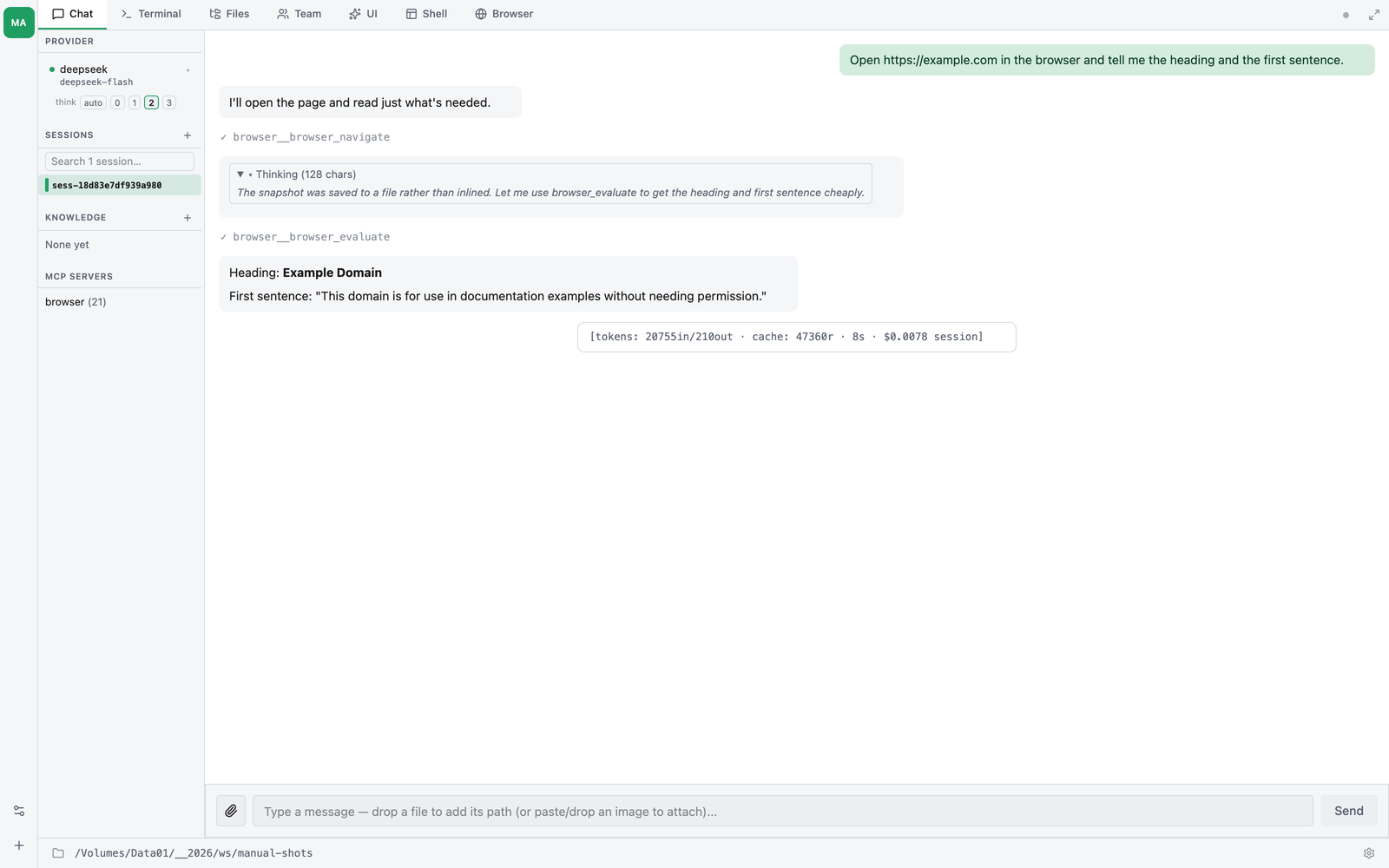
thClaws ships with around thirty built-in tools. The agent picks them
autonomously; you see each call as a [tool: Name: …] line, then a
✓ (success) or ✗ (error). This chapter is the reference.
File tools
| Tool | Approval | Summary |
|---|---|---|
Ls |
auto | Non-recursive directory listing |
Read |
auto | Read a file (whole or line-range slice) |
Glob |
auto | Shell-glob pattern matching; respects .gitignore |
Grep |
auto | Regex search across files; respects .gitignore |
Write |
prompt | Create or overwrite a file |
Edit |
prompt | Exact string replacement (fails if non-unique) |
All of them are scoped to the sandbox (Chapter 5).
For large files the agent is trained to use Glob + Grep first to
narrow down, then Read with a line range, rather than slurping the
whole file — but there is no hard size cap enforced by the tool, so
Read on a multi-gigabyte file will try to load it. If you need a
binding upper bound, run in ask mode and deny the call.
Shell
| Tool | Approval | Summary |
|---|---|---|
Bash |
prompt | Run a shell command via /bin/sh -c |
Defaults:
- 2-minute timeout (override with
timeout_msup to 10 min). - Output over 50 KB truncated; full text saved to
/tmp/thclaws-tool-output/<id>.txt. - Destructive patterns (
rm -rf,sudo,curl | sh,dd,mkfs,> /dev/sda) flagged with⚠before the approval prompt. - Long-running servers: the agent is trained to either run them in
the background (
... &) or wrap them intimeout 10so the turn can’t hang. - Python
venvauto-activated if./.venv/bin/activateexists (the tool sources theactivatescript before running).
Web
| Tool | Approval | Summary |
|---|---|---|
WebFetch |
prompt | HTTP GET (100 KB body cap, per section). When HAL_API_KEY is set, runs both a HAL headless-browser scrape and a plain HTTP GET in parallel and returns a single combined response with each section labelled (see below). |
WebSearch |
prompt | Web search via Tavily / Brave / SerpAPI (Google) / You.com / Serply (Google) / DuckDuckGo |
WebScrape |
prompt | Direct HAL scrape with advanced parameters (wait_for CSS selector, scroll_to_bottom, remove_selectors, output_format) — appears only when HAL_API_KEY is set |
YouTubeTranscript |
prompt | Fetch YouTube captions via HAL (multi-language fallback, optional timestamps) — appears only when HAL_API_KEY is set |
Search provider is picked via TAVILY_API_KEY, BRAVE_SEARCH_API_KEY,
SERPAPI_API_KEY, YDC_API_KEY or SERPLY_API_KEY if set, else DuckDuckGo (no key,
lower quality). Override with
searchEngine: "tavily" in settings.
WebFetch combine behavior (HAL_API_KEY set)
Pre-fix WebFetch did a single plain HTTP GET. With HAL_API_KEY configured it now fires both paths in parallel and returns the model a labelled dual-section response:
[via HAL scrape — JS-rendered + extracted to Markdown]

# {page title}

(rendered Markdown content)

---

[via plain HTTP GET — raw response body]

(raw HTTP body — preserves JSON, headers-style content, anything HAL might mangle)
The agent picks the slice that answers its question:
- HAL section for SPA / JS-rendered / docs / blog content
- Plain GET section for JSON APIs / sitemaps / robots.txt / anything where raw bytes matter
If one path fails, the other still comes back with a [note: …] line explaining the drop. prefer_raw: true skips HAL entirely (faster, half the tokens) — use when you know the URL is a JSON endpoint. max_bytes (default 100 KB) caps each section independently. Without HAL_API_KEY, WebFetch is just a plain GET as before.
Service-key tools (HAL)
WebScrape and YouTubeTranscript call HAL’s public API
(hal.thaigpt.com/api) — both gated on a single HAL_API_KEY. Paste
it in Settings → Providers → Service keys → HAL Public API, or set
HAL_API_KEY in your shell. The tools auto-appear in the model’s
tool list when the key is present and disappear when it isn’t, so
they never waste tokens or invite failed calls. Live key changes flip
them in/out on the next turn — no restart.
Reach for WebScrape directly only when you need advanced HAL parameters (wait_for CSS selector, scroll_to_bottom for lazy content, remove_selectors to strip nav/ads, or switching output_format to html_markdown / json). For ordinary page reads, prefer WebFetch so the model also gets the raw plain-GET payload alongside HAL’s rendered output.
This requires-env pattern is general: any tool can declare requires_env and the registry filters it out when the listed env var(s) aren’t set. The two HAL tools are the first concrete users.
Documents — PDF & Office
Native Rust tools for producing and reading PDF, Word, Excel, and PowerPoint files. Clean-room ports of Anthropic’s source-available skills so thClaws can redistribute them under MIT/Apache. Embedded Noto Sans + Noto Sans Thai fonts ship in the binary (~650 KB total) so Thai content renders correctly without a system-font dependency.
| Tool | Approval | Summary |
|---|---|---|
PdfCreate |
prompt | Markdown → PDF (printpdf + embedded Thai font, A4/Letter/Legal) |
PdfRead |
auto¹ | Extract text via pdftotext (poppler-utils), else the document service; scanned pages are OCR’d (ocr: auto / vision / tesseract) |
DocConvert |
prompt | Convert on the document service: Word/Excel/PowerPoint/OpenDocument/.doc/.xls/.ppt ↔ each other or → PDF; .html → typeset PDF. Writes beside the source, never overwrites |
DocxCreate |
prompt | Markdown → Word (.docx) via docx-rs — headings, lists, code blocks |
DocxRead |
auto | Extract text from a Word doc (pure Rust XML walk) |
DocxEdit |
prompt | find_replace / append_paragraph in place |
XlsxCreate |
prompt | CSV or JSON 2D-array → Excel (.xlsx) via rust_xlsxwriter |
XlsxRead |
auto | Read XLSX/XLSM/XLSB/XLS/ODS via calamine; CSV or typed JSON output |
XlsxEdit |
prompt | set_cell / set_cells / add_sheet / delete_sheet — format-preserving via umya-spreadsheet |
PptxCreate |
prompt | Markdown outline → PowerPoint (.pptx); # Heading = new slide |
PptxRead |
auto | Extract text per slide (numeric ordering — slide10 doesn’t sort before slide2) |
PptxEdit |
prompt | find_replace across all slides — designed for {{placeholder}} template fill |
¹ Reading a PDF without installing poppler. PdfRead prefers
pdftotext on your machine: it is the best extractor there is for Thai and
the file never leaves your computer. If poppler is not installed, rather than
failing, thClaws offers to extract the text on the document service behind
your thClaws Gateway — or, signed out, through a public thClaws service that
needs no account and no key — and asks you first, naming the file and
where it is going. The text comes back marked so you can see which path
produced it. On an Enterprise install the document service is your
organisation’s own gateway, so it is used without asking.
Three things worth knowing:
- Install poppler and the question stops being asked
(
brew install poppler,apt install poppler-utils,winget install oschwartz10612.Popplerorscoop install poppler). - Set
"pdfCloudFallback": falsein.thclaws/settings.jsonand nothing is ever uploaded — you get the install instructions instead. Do this if your PDFs are confidential by default. - Scanned PDFs. When a PDF has no text layer,
ocr: "auto"(the default) OCRs it on the document service (Thai + English) and sends any page the OCR is unsure of (confidence under 70) to the model as an image. With no document service available — or with poppler installed on an open-core desktop, where nothing leaves the machine unasked — the pages are rendered locally withpdftoppmfor the model to read, as before.ocr: "vision"always uses the images;ocr: "tesseract"returns OCR text only. The public service returns text only.
Thai rendering across formats:
PdfCreateembeds the Noto Sans Thai TTF directly in the PDF — Thai renders identically on every viewer regardless of installed fonts.DocxCreate/PptxCreateset<w:rFonts w:cs="Sarabun"/>/<a:cs typeface="Sarabun"/>per run, with Thai at the same point size as the Latin text. Sarabun is a free Google Font; the document service that converts and previews files has it installed. On a computer without it, Word and PowerPoint substitute a system Thai font — install Sarabun for documents to look as intended.XlsxCreateuses Calibri (Excel’s default) — Excel’s text engine handles Thai script via the OS Thai font stack with no per-cell configuration.
Edit-tool semantics:
DocxEdit/PptxEditfind_replacematches per text-run. Word and PowerPoint split text across runs when style changes mid- paragraph (e.g. one bold word in a sentence), so a substring spanning a styled boundary won’t match. For docs you authored with the matching*Createtool this is a non-issue (each block is a single run); for human-authored docs with rich styling, flatten styling first.XlsxEditis format-preserving —umya-spreadsheetis built for round-trip; styles, formulas, charts, and conditional formatting in unrelated regions survive the load+modify+save cycle. Cells use A1- style addresses (B7,AA12).
Media — image & video generation
Provider-abstracted tools for generating and editing images and video.
One tool per task; the provider + model arguments pick the backend.
Off by default — see “Enabling media tools” below. Images are
written to output/img-<ts>-<hash>.<ext>; videos run as async jobs and
land at output/vid-<ts>-<hash>.mp4 once finished.
| Tool | Approval | Summary |
|---|---|---|
TextToImage |
prompt | Prompt → image |
ImageToImage |
prompt | Source image + prompt → edited image |
TextToVideo |
prompt | Prompt → video (async job) |
ImageToVideo |
prompt | Source image as first frame + prompt → video (async job) |
MediaJobStatus |
auto | Poll an async video job by job_id → running / done (path) / failed |
TextToSpeech |
prompt | Text → speech audio (Gemini TTS). Written to output/ like the other media, so a long narration never travels through the conversation |
RenderSlides |
prompt | A Marp markdown deck → PDF + one PNG per slide, via the thClaws slide-render service |
QuizRender |
prompt | Renders a generated study quiz into a playable artifact — what /quiz calls |
Models & keys (choose with the model argument):
| Provider | Image models | Video models | Key |
|---|---|---|---|
| Google Gemini | gemini-3.1-flash-image, gemini-3.1-pro-image |
veo-3.1-fast-generate-preview, veo-3.1-generate-preview, veo-3.1-lite-generate-preview |
GEMINI_API_KEY / GOOGLE_API_KEY |
| OpenAI | gpt-image-2 |
— | OPENAI_API_KEY |
| Alibaba DashScope | qwen-image-2.0, qwen-image-2.0-pro |
happyhorse-1.0-t2v (text→video), happyhorse-1.0-i2v (image→video) |
DASHSCOPE_API_KEY |
| LTX (Lightricks) | — | ltx-2-3-fast (alias ltx), ltx-2-3-pro (ltx-pro), ltx-2-5-fast (ltx-2-5), ltx-2-5-pro |
LTX_API_KEY |
- Video is asynchronous.
TextToVideo/ImageToVideosubmit the job and return ajob_idimmediately — the file isn’t ready yet. CallMediaJobStatus { job_id }to poll:running,done(with the savedoutput/…mp4path), orfailed(with the provider error). Job state is journalled to.thclaws/state/media-jobs.jsonl, so a poll survives a restart. - Clips are 4–8 seconds.
resolutionis honoured by LTX and HappyHorse (720P/1080P, plus4Kon LTX); Veo ignores it and renders at its aspect’s native size. - LTX generates its own audio, including Thai speech, and is the one
backend that holds a character’s face across shots when you drive it
from a reference portrait with
ImageToVideo. Its only audio switch isgenerate_audio(default true;falsegives a silent clip) — there is no voice, language or accent parameter, so the speech is steered from the prompt: put the line in quotation marks and name the language and accent (she says in Thai, natural Bangkok accent: "…"). Two knobs matter for how it comes out:fps(24/25/48/50 — 48 or 50 resolves the P/B/M lip closures that 24/25 smears) andduration, which must be long enough to say the line without rushing. LTX accepts 4, 6, 8, 10 … 20 seconds; anything else is snapped to the nearest of those.ltx-2-5-*is the current generation (better speech, multi-shot scenes that keep one voice across cuts) at roughly 2× the 2.3 price. It takes pixel sizes rather than aspect tiers, soaspect_ratio: 9:16transposes the chosen resolution (1080P → 1080x1920).LTX_BASE_URLrepoints it at a self-hosted deployment. ImageToVideouses a local image as the first frame, sent inline (base64 data URI) — no separate upload step.
Enabling media tools
Media tools cost money per image / per video-second, so they’re off by
default. Turn them on in settings.json:
// ./.thclaws/settings.json
{ "mediaToolsEnabled": true }   // legacy alias: "imageToolsEnabled"
The built-in Media Studio GUI shell (Chapter 26) auto-enables them for its own session regardless of this flag — it’s the no-config, point-and-click on-ramp for people who aren’t driving the agent from chat.
Video review & movie-making
| Tool | Approval | What it does |
|---|---|---|
WatchVideo |
prompt | Lets the model watch a local video: pulls scene-aware key frames (so it can see what happens) + a Whisper transcript when GROQ_API_KEY is set. Use it to review or critique a clip. |
FilmCompile / FilmGenerate / FilmJobStatus / FilmJobCancel / FilmAssetImport |
FilmGenerate + FilmAssetImport prompt |
The Movie Maker toolkit — turn a .film screenplay into a finished AI video. Hidden until you install the Movie Maker agent (which opens the filmscript gate). FilmGenerate needs a budgetUsd — that’s your spend cap + consent. Movie Maker is a catalog agent, not part of the engine: install it with /cloud get movie-maker-2 and it ships its own guide. |
Other tools
FetchImages— downloads every remote image in a Markdown file into a siblingimages/folder and rewrites the links (used by content-extractor agents). Confined to your workspace.FolderIndex— builds<folder>/index.md: one table row per file with a short title (what it’s about) and a description, both written from the file’s content, not its name. Deterministic — it walks the tree, fingerprints every file (sha256), writes the index, and hands thefolder-indexeragent only the files whose bytes changed since their cached summary, so re-indexing a settled folder re-reads nothing. The fingerprint cache lives beside the index in<folder>/.thclaws-index.json; delete it to start over. Hidden until thefolder-indexeragent is used (right-click a folder in the Files tab → Index folder…, or/index).report_depth: 1keeps the index to one level: this folder’s own files plus one row per immediate subfolder saying what’s inside it — everything deeper is still scanned and summarized (that’s what those rollups are written from), it just isn’t listed. In the Files-tab modal that’s This folder + one row per subfolder.EpubCreate— Markdown → EPUB e-book (joins the Word/Excel/PowerPoint/PDF document tools above).
User interaction
| Tool | Approval | Summary |
|---|---|---|
AskUserQuestion |
auto | Pause the turn and ask you a typed question |
EnterPlanMode |
auto | Switch to planning mode (no mutations until ExitPlanMode) |
ExitPlanMode |
auto | Resume normal execution |
Task tracking
| Tool | Approval | Summary |
|---|---|---|
TaskCreate |
auto | Add a task / todo |
TaskUpdate |
auto | Change status (pending / in_progress / completed / deleted) |
TaskGet |
auto | Look up a task by id |
TaskList |
auto | Show current tasks |
TodoWrite |
auto | Replace the whole todo list in one call (Claude Code–style) |
TaskCreate/Update/Get/List are the granular, per-item interface;
TodoWrite rewrites the whole list at once and is what the agent
reaches for during long planning turns. See them mid-turn with
/tasks.
Spawning agents
| Tool | Approval | Summary |
|---|---|---|
Task |
prompt | Spawn a sub-agent for an isolated sub-problem |
WorkflowRun |
prompt | Author + run a JavaScript workflow that fans work across many subagents |
Sub-agents get their own tool registry and can recurse up to depth 3
(Chapter 15). WorkflowRun is the model-driven entry
to workflows (Chapter 25).
Memory
| Tool | Approval | Summary |
|---|---|---|
MemoryRead |
auto | Read one entry from the persistent file-based memory |
MemoryWrite |
prompt | Create or replace a memory entry (frontmatter + body) |
MemoryAppend |
prompt | Append to an existing memory entry |
Cross-session memory that persists who you are and how you like to work — see Chapter 8.
Goals (autonomous /goal mode)
| Tool | Approval | Summary |
|---|---|---|
RecordGoalProgress |
auto | Log a step of progress toward the active goal |
MarkGoalComplete |
auto | Declare the goal done — ends the autonomous loop |
MarkGoalBlocked |
auto | Flag the goal as blocked (needs your input) |
Registered only while a /goal autonomous run is active; the loop uses
them to report progress and decide when to stop.
Knowledge base (KMS)
| Tool | Approval | Summary |
|---|---|---|
KmsRead |
auto | Read a single page from an attached knowledge base (prepends a [note: …] staleness banner when verified: is missing or > 90 days old) |
KmsSearch |
auto | Grep across all pages in one knowledge base |
KmsWrite |
prompt | Create or replace a page; auto-injects a # {title} heading; warns when sources: frontmatter is missing |
KmsAppend |
prompt | Append content to an existing page |
KmsDelete |
prompt | Remove a page (last resort; prefer KmsWrite to merge or supersede) |
KmsCreate |
auto | Ensure a KMS exists (idempotent). Used by /dream to bootstrap the dreams audit KMS. |
KmsWriteSource |
prompt | Save a fetched web page into the KMS’s sources/ directory as an offline reference — the raw layer-1 input that a synthesis page cites, kept so a page’s evidence survives the URL going away |
These are always registered regardless of whether a KMS is currently active. Pre-fix the registration was gated on kms_active being non-empty, which silently broke /dream and other side-channel agents that need to bootstrap an audit KMS from a zero state. The model sees each active KMS’s index.md in the system prompt and calls these tools to pull in specific pages on demand.
[tool: KmsSearch(kms: "notes", pattern: "bearer")]
Returns page:line:text lines. Full concept + workflow + page-shape convention (title: / topic: / sources: / verified:) in Chapter 9.
MCP tools
Every MCP server’s tools are discovered at startup and registered with
names qualified by server: weather__get_forecast,
github__list_issues, etc. All prompt for approval. Details in
Chapter 14.
Gated tools — GUI Shell
Some tools are registered but hidden until a skill opens their gate. While closed they cost zero tokens — the model never sees their names — and they surface only when actually needed. The GUI-Shell authoring tools (for building a custom HTML frontend, Chapter 26) work this way:
| Tool | Approval | Summary |
|---|---|---|
GuiShellCreate |
prompt | Scaffold a new GUI Shell (manifest + entry HTML) under .thclaws/gui-shell/<id>/ |
GuiShellWriteFile |
prompt | Write/overwrite a file inside a GUI Shell — path-jailed to its own directory |
GuiShellList |
auto | List the installed GUI Shells |
GuiShellRemove |
prompt | Delete a GUI Shell |
How the gate opens
- Each gated tool declares a gate.
Tool::requires_gate()returnsSome("gui-shell"), so the per-turn tool filter hides it — the same mechanismrequires_envuses for service-key tools. The fourGuiShell*tools are invisible to the model and add nothing to the system prompt. - A skill owns the gate. The bundled
gui-shellskill declarestool-gate: gui-shellin its frontmatter (Chapter 12). - Invoking the skill opens it. The skill triggers when you ask to
“build a UI / dashboard / custom frontend …”; when the model calls it,
SkillTool::callrunsactivate_gate("gui-shell"). - It takes effect next turn. Gates are process-global and
session-sticky — once open, they stay open for the session. The
per-turn filter re-checks gates on the next request, so the
GuiShell*tools become visible and callable without rebuilding the agent or registry.
So the model can’t reach the GUI-Shell tools out of nowhere — it has to go through the skill first, which is exactly what surfaces them. This gated-tool-group mechanism is reusable: future tool groups can be lazily surfaced the same way (a skill opens the gate → the group appears).
Reading the tool stream
A normal turn looks like:
❯ check if there's a README and show me its first section

[tool: Glob: README*] ✓
[tool: Read: README.md] ✓ 0.2s
The README's first section is "Install" — it walks through…
[tokens: 2100in/145out · 1.8s]
[tool: Name: detail]— tool being called with an abbreviated argument preview (first path, command, URL, search query, etc.). Secret-looking values such as tokens, API keys, passwords, and bearer auth headers are redacted before display.- Trailing
✓ <duration>— tool succeeded and shows how long it ran. - Trailing
✗ <error>— tool failed; the model gets the error back and may retry with a different approach. - Long-running tools emit a low-noise heartbeat after about 10 seconds, then roughly every 30 seconds while still active:
[tool: Bash (cargo test -p thclaws-core)] still running 40s
Tool output truncation
Shell commands and file reads that produce more than 50 KB of output
have the body truncated in the model’s view. A small preview is kept
for the model; the full content is saved to
/tmp/thclaws-tool-output/<tool-id>.txt so you can inspect it. The
model is told about the truncation and the preview is usually enough
to proceed.
Limiting which tools run
Three mechanisms:
allowedTools/disallowedToolsin settings — removes tools from the registry so the model never sees them. Useful for “read-only review” workflows.- Agent defs (Chapter 15) — per-agent tool scopes override the global registry.
- Permissions (Chapter 5) — tools stay in the registry but prompt
you before running;
ndenies the call.
Hooks on tool events
Shell commands can fire on pre_tool_use / post_tool_use /
post_tool_use_failure / permission_denied — see Chapter 13.